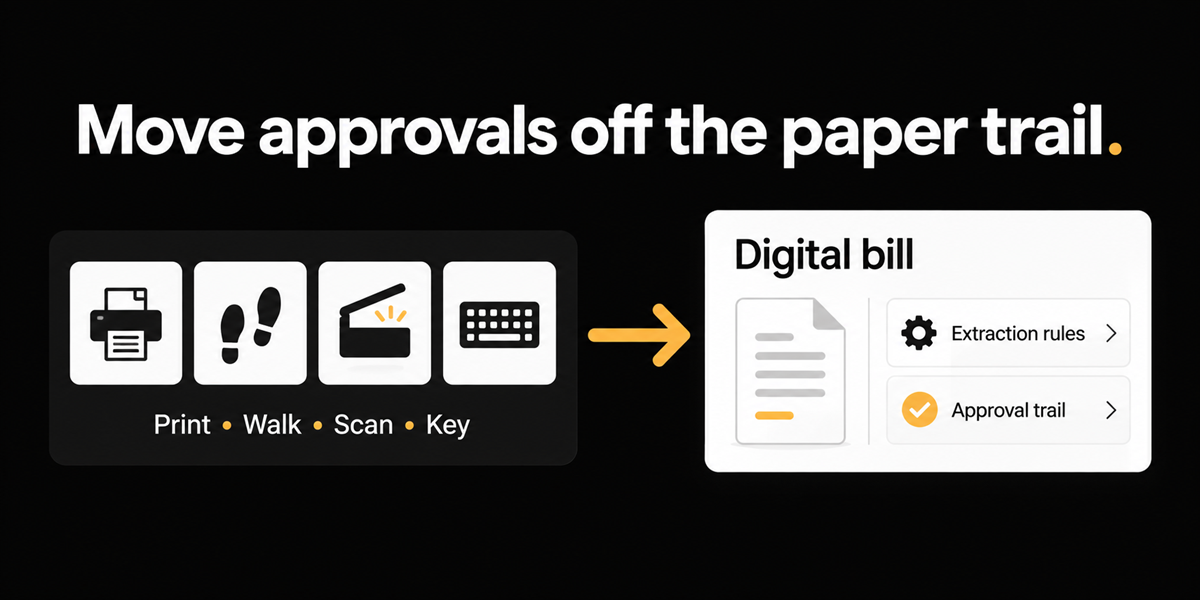
An accounting lead at a real estate developer mid NetSuite go-live described the old loop without exaggeration. Print the invoice. Walk it around the office for approvals. Scan it back in. Capture manually. Somewhere in the same confession: storing invoices in cardboard boxes for a year of coping.
They were not shopping for a romantic story about paperless offices. They wanted automation that would let approvers act without buying every person a NetSuite seat, and extraction rules strong enough that capture stopped being re-key theatre.
The direct answer: digital approvals and instructable extraction make the print-walk-scan-key loop optional. Cardboard boxes were never a retention strategy. They were a symptom.
This matters most if you are leaving a paper approval culture during an ERP go-live, if seat cost is shaping who can approve, and if boxes or shared drives are still the archive.
The loop has four failure points
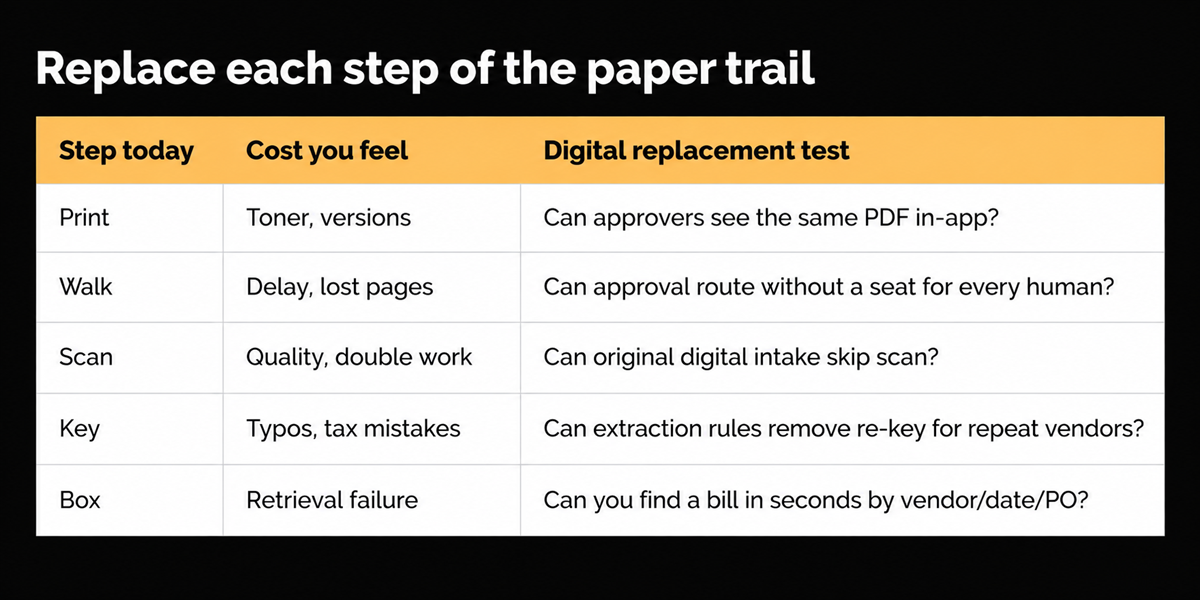
Print introduces version drift. Walk introduces delay and lost paper. Scan introduces image quality problems. Key introduces human error. Each step feels cheap. Together they are an AP system made of shoes and toner.
The second problem appears when a company buys NetSuite (or any ERP) and keeps the loop because approvers are not all licensed. The ERP becomes the ledger. The hallway remains the workflow.
Real estate and home building make the cardboard vivid, but the loop shows up in wholesale and manufacturing too. The artifact changes. The shoes stay.
Benchmarks and retention reality
Ardent Partners' Metrics That Matter in 2025: $9.40 average cost per invoice, 32.6 percent touchless, 14 percent exceptions. Paper-heavy approval chains are a structural way to stay on the wrong side of those averages.
CRA guidance expects businesses to keep records for six years from the end of the relevant tax year in normal cases. Boxes can store paper while failing retrieval. Digital archives only win if they remain complete and readable. "Optional cardboard" is not "delete everything."
Hallway-to-digital diagnostic
What we built toward
Extraction rules that encode how to read messy vendor documents, digital approval paths that do not require every approver to live inside the ERP, and an AP object that holds the bill without a cardboard detour. Multi-entity switchers matter for developers with many NetSuite subsidiaries. Mobile approve questions come up; treat channels carefully and do not invent SMS surfaces that staging did not show.
We rejected the idea that ERP go-live alone retires hallway approvals. Ledgers do not walk themselves.
Where this does not help
Many vendors kill paper approvals. If your differentiator search stops at "we are digital," you will not shortlist well. Pair this narrative with extraction depth or multi-entity session design, or you are retelling a 2014 story.
Utility portal downloads and other fetch problems remain separate. Digital approvals do not retrieve a bill trapped on a vendor website.
Deliberate choice: tell the cardboard story as a wedge into extraction and approval design, not as a claim that paper death is unique to us.
Back to the hallway
Print, walk, scan, key felt responsible. It was mostly slow. Put the bill in a system people can approve without shoes. Keep records for CRA. Leave the boxes for moving day.
Seat cost is an AP design input
Finance teams sometimes treat licensing as procurement's problem and hallway routing as AP's problem. They are the same problem. If occasional approvers cannot act without a full ERP seat, paper returns. Score automation options on whether approval can happen without seat sprawl, not only on whether the ERP can store a PDF.
What to film in week one of an ERP go-live
Film one invoice that used to print. Show intake, extraction rule if relevant, approval by someone who does not have a full ERP seat, and retrieval of the stored PDF. That forty-second clip beats a paperless slogan in any steering committee. If you cannot film retrieval, you have built another box, just with electricity.
Multi-entity developers feel the hallway twice
With roughly ten NetSuite entities live and a hundred to two hundred invoices a month, hallway approvals multiply by entity politics. Digital approvals plus an org switcher are paired needs. Ending cardboard without ending session thrash leaves half the pain. Treat them as one modernization story.
Extraction is what makes digital approvals honest
Digital approval of a bad keying job just moves the hallway error into software. Extraction rules that pull PO numbers, pick tickets, and quantity-shipped columns correctly are what make the approved PDF trustworthy. Pair the cardboard story with extraction depth or you will digitize a mess.
Boxes fail retrieval under time pressure
The painful audit moment is never "do we have boxes." It is "find the invoice for this vendor on this job from March." Cardboard fails that test. Shared drives without structure fail it too. Digital AP objects win when search fields are mandatory and attachments cannot wander into personal folders. Build that discipline during go-live week, not after the first CRA request.
Steer clear of paperless vanity metrics
"Percent paperless" is a weak KPI if retrieval still fails and coding is wrong. Prefer: median hours from invoice receipt to approval, share of invoices that never print, search success in under a minute, and correcting journals after post. Those numbers describe whether the hallway actually died.
Approver UX without app theatre
Occasional approvers will ignore a heavyweight app. They will respond to a clear queue and a short action. Design approval for the person who approves twice a week, not only for the AP clerk who lives in the system. That design is what kills the walk around the office.
Pair with extraction posts in the cluster
This hallway story is a narrative opener. The lasting differentiation is extraction rules, multi-entity sessions, and approval design without seat sprawl. Publish or link those alongside so readers do not leave thinking paperless alone was the product.
Go-live week is the best window
Wait six months after ERP go-live and hallway habits harden. Pair AP automation with subsidiary go-live while training attention is already allocated. The cardboard boxes disappear faster when the ledger change and the workflow change arrive together.
Who this applies to, restated
If invoices still print for signatures during or after an ERP go-live, or if cardboard or personal folders are the archive, this post is your checklist. If you are already fully digital and searching is instant, skim for seat-sprawl and extraction pairing, then move to deeper topics in the cluster.
Frequently asked questions
Do we need mobile approvals on day one?
Nice to have. Ending print-walk is the day-one win. Mobile follows when approvers travel.
Will NetSuite seats go to zero?
Unlikely. The goal is that every occasional approver does not need a full seat to unstick AP.