A finance lead at a metals and specialty materials startup described a failure mode that has nothing to do with OCR accuracy. QuickBooks held the ledger. A proprietary system held inventory and POs. They had already sat through Ramp and Bill.com evaluations.
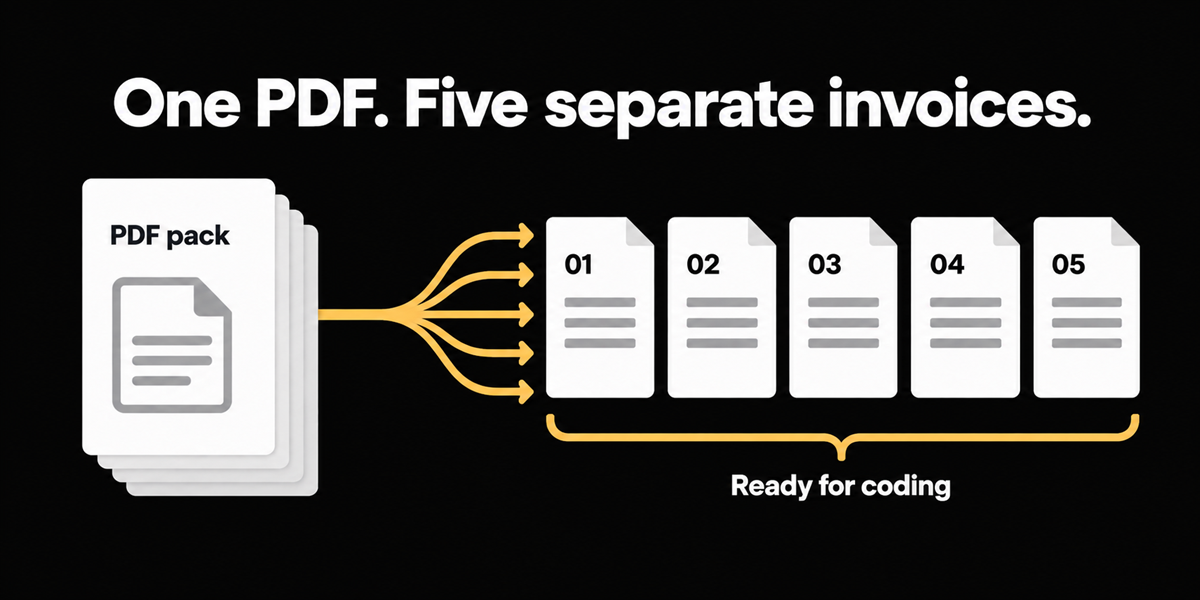
Vendors emailed a single PDF that held multiple invoices. The tool they were testing could not tell those invoices apart. They had no control to split the document. Separately they asked whether a system could identify invoices from emails that carried multiple attachments.
Short answer: compound PDFs and multi-attachment emails are an intake problem before they are an extraction problem. If the file never becomes discrete invoice objects, every downstream promise (match, approve, pay) is arguing about the wrong unit of work.
Who this applies to: AP teams whose carriers, mills, or logistics vendors regularly send multi-invoice packs or multi-file emails, especially if a current tool leaves you manually splitting in Preview or Acrobat before coding starts.
The second failure after "we capture PDFs"
Most AP automation marketing assumes one attachment equals one invoice. Real vendor behavior disagrees.
A pack arrives as five invoices stapled into one PDF because that is how the supplier's billing run prints. Or the email carries three PDFs and a statement. Your clerk becomes a document surgeon: split, rename, re-upload, hope nothing was missed. That labor never shows up in a touchless-rate slide because the touch happened before the software clock started.
In the metals demo, the Ramp comparison was concrete. Multiple invoices lived in one document. The tool did not understand they were different invoices. There was no control to split. That is not a niche edge case. It is a common mid-market intake pattern in distribution and materials.
A sibling failure shows up when Excel rides along as an attachment. Teams hope the workbook becomes a structured bill. In our demos we were explicit: Excel may sit unclassified until it is a PDF the classifier can treat as a bill. Pretending otherwise creates false confidence.
Cycle time starts before your capture dashboard
Ardent Partners' State of ePayables 2024 still pegs average all-inclusive invoice processing cost at $9.40 and average cycle time at 9.15 days. Manual pre-split work is pure cycle-time drag. It also multiplies exception risk. Split wrong once and you duplicate a page or drop a credit memo into the wrong bill.
If your dashboard says average handling time is twelve minutes, ask whether that clock includes the Acrobat session. If it does not, you are measuring the easy half of the job.
What we built, and the boundary we kept
We classify and split compound PDFs into discrete invoice objects so each bill can be coded, matched, and approved on its own. Multi-attachment emails sit in the same family of intake. More than one file should not require a human to play traffic cop before the queue.
Cover sheets and non-invoice pages belong in Unclassified rather than forced into a fake bill. Staging shows Unclassified, Invoices, and Packing slips as first-class surfaces, with an empty state that says all documents have been classified when the queue is clean.
Compound PDF split ships as a topic-ready capability. Honest limits from staging and demos: Excel attachments may stay unclassified until PDF. We will not invent a page cap or a perfect accuracy claim for every handwritten pack. Boundary clarity still matters. Review remains available when the split looks wrong.
What we refused: pretending "PDF support" equals "pack support." Reading fields from page 1 of a five-invoice file is how you create silent cross-invoice contamination. One blended total looks efficient and is wrong.
Score your current tool tomorrow morning
Take one real multi-invoice PDF from the last 30 days (three or more invoices). Without splitting it by hand, drop it into your current AP inbox or capture product. Score the result.
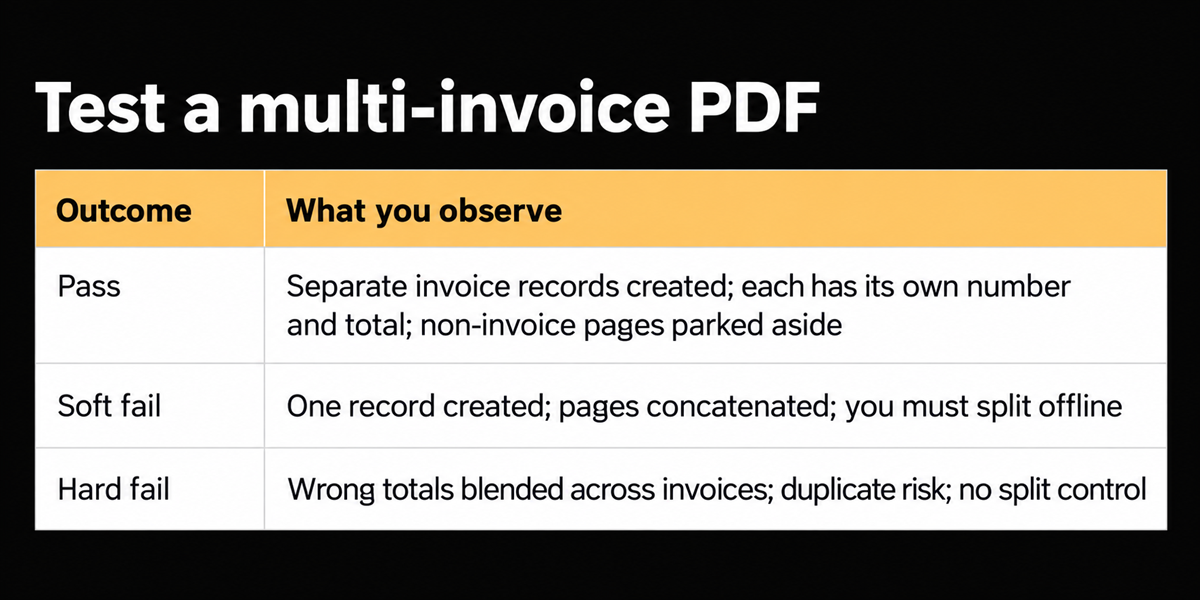
If you land in soft or hard fail, your automation clock is lying about where work starts.
Ask vendors in writing:
1. Do you split compound PDFs into discrete invoices automatically?
2. Where do cover pages go?
3. What happens to .xlsx attachments?
4. Can I override a bad split without re-emailing the supplier?
5. How do duplicates get flagged if the same pack is forwarded twice?
Keep the answers next to your Ramp or Bill.com notes. Intake honesty matters more than another screenshot of a clean single-page invoice.
Where this does not help
We deliberately prioritize clear invoice boundaries over heroic reconstruction of chaotic scans. If a pack is a blur of handwritten tickets with no reliable breaks, expect review, not magic.
We also do not claim Excel workbooks become structured bills by wish. That boundary is intentional. Convert to PDF when you need the bill object, or use a different extraction path designed for spreadsheet dumps.
Split is not payment. After the pack becomes five invoices, coding, tax, PO match, and approval still have to be true. Split removes the stapler tax. It does not retire AP judgment.
And split will not fix a vendor who emails the wrong company entity. Classification gets the document type right. Entity routing is a separate configuration.
Why email multi-attach is the same story with different packaging
A single PDF pack and an email with five attachments create the same AP question: what are the payable objects? If your tool creates one mail record and leaves humans to open each file, you have shifted the stapler into Outlook.
In demos, buyers asked directly whether the system could identify invoices from emails with multiple attachments. The right product answer is not a shrug toward "our IMAP connector." It is discrete invoice creation per bill, with non-invoice files parked where they belong.
Pair that with duplicate detection. Packs get forwarded. The same five invoices can arrive twice in a week. Split without duplicate awareness just accelerates double entry.
If you are comparing tools this quarter, bring the ugliest pack from the last billing cycle to every demo. Pretty single-page samples hide the failure. The pack is the test. Ask them to narrate what happens to page order, credit memos, and cover sheets while you watch. Silence on those details is an answer.
FAQs
Is this the same as page-range splitting in Acrobat?
No. Page-range splitting assumes a human already knows the boundaries. Compound split is about detecting invoice boundaries and creating payable records, including sending non-invoice pages to Unclassified.
What if two invoices share a page?
That is an ugly edge case. Expect human review. We would rather flag confusion than invent a clean cut that destroys evidence.
Close
When five invoices arrive as one PDF and the tool cannot split them, the team does not have an AI problem yet. They have an object problem. Fix the object count first. Then argue about extraction quality on each real bill.