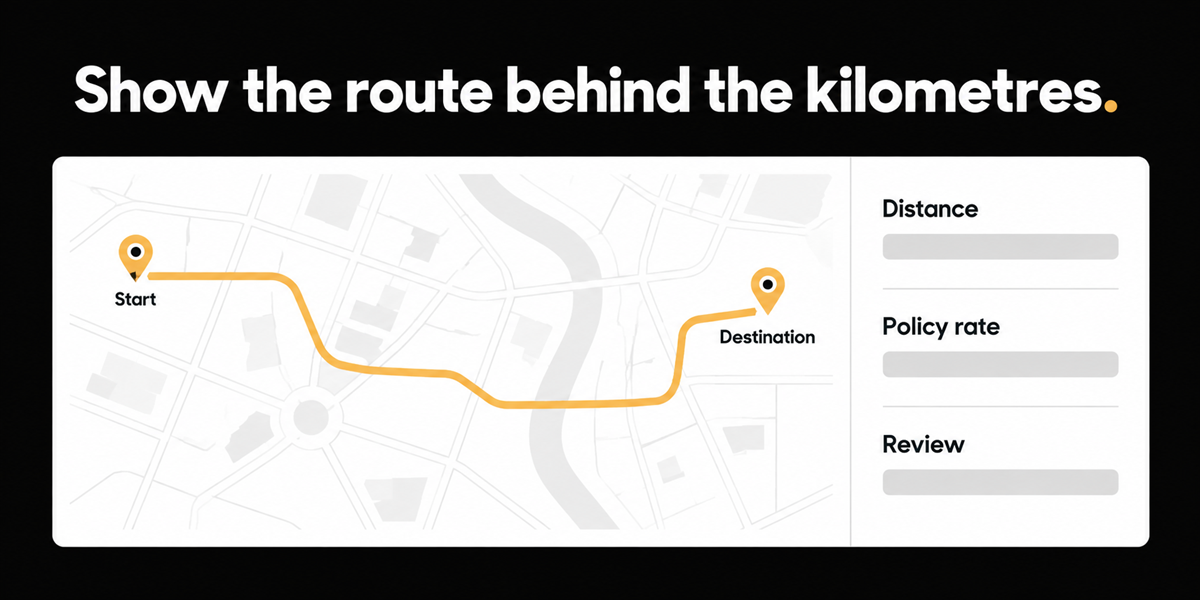
A transportation and logistics finance leadership group on Great Plains or Business Central still collects out of pocket sales mileage on Excel style expense report submissions. In the demo, address search built a route and calculated distance. The audible reaction was immediate: better than typing 22 kilometres or 18 kilometres, with detailed tracking an approver could actually see on the claim. A smaller association side demo showed the same shape: mileage with address search and a rate, aimed at teams who do not want a heavy expense suite.
Guessed kilometres are not an audit trail for Canadian finance teams that take control seriously. If approvers only see a number, they cannot test reasonableness without opening a map themselves and reconstructing the trip from memory.
This matters most if sales or field staff claim personal vehicle mileage, if you reimburse by kilometre rather than fuel only, and if approvals today happen on spreadsheets with no route evidence.
Why flat kilometre entry fails quiet audits
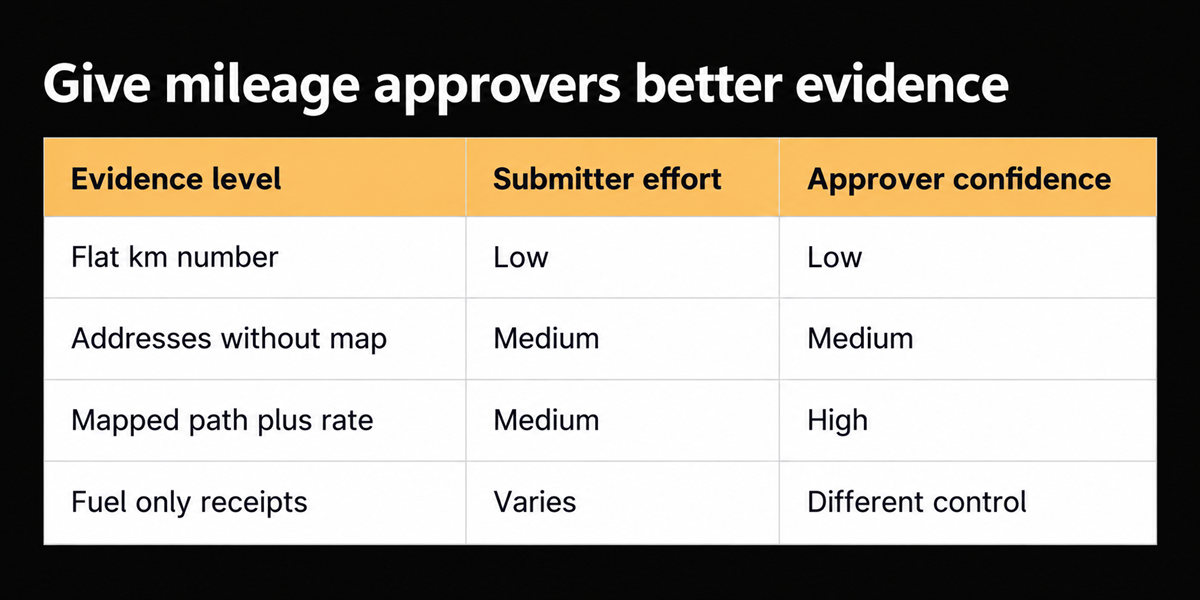
Flat entry optimizes for speed at submission and creates doubt at approval. Twenty two kilometres might be right. It might be a rounded commute hybrid. It might be a round trip entered as one way or the reverse. Without origin, destination, and a plotted path, the approver's choice is trust or pedantry.
Canadian reimbursement also sits on published rates. For 2026, the Department of Finance announced prescribed automobile allowance limits of 73 cents per kilometre for the first 5,000 business kilometres in the provinces, and 67 cents thereafter (77 and 71 in the territories). Those are CRA relevant prescribed limits for tax free allowances when used as intended. Your policy may match them, undercut them, or vary by vehicle class. None of that policy is visible in a blank "km" box on a spreadsheet.
The second problem is fragmentation. Mileage lives in Excel while vendor bills live in AP and cards live in another tool. Approvers context switch. Finance rekeys. The route never joins the payable record.
External grounding
CRA and Finance Canada publish the prescribed per kilometre rates annually; use the 2026 figures above and link finance staff to the CRA automobile allowance pages for current application. Separately, the GBTA Foundation and HRS study (2015) estimated $58 to process a simple expense report and found 19% of reports contained errors requiring more time. It is old and hotel oriented, but it still explains why weak evidence on mileage claims is expensive: errors and disagreements burn reviewer minutes.
We are not claiming a measured Finofo outcome on mileage cycle time. Measure your own: average minutes an approver spends validating kilometre claims, and how often they ask for a rewrite.
A policy checklist before you buy a map widget
- Do you reimburse mileage, fuel, or both?
- Which rate table applies (CRA prescribed, internal, union, vehicle class)?
- Are round trips default or explicit?
- Is commuting excluded, and how is that enforced?
- What evidence must the approver see: addresses only, mapped path, or odometer photos?
Reader usable test: take ten recent mileage lines from Excel and rebuild them in any public map tool. Note how many differ by more than 10% from the claim. That sample is your audit risk without software branding.
What we showed in demos, with an honest staging note
In product demos we show address search, a mapped path, kilometre detail, and rate application (including vehicle class oriented rates when configured), with the approver able to see the route rather than a naked number. That is the capability buyers reacted to.
Staging verification note for this wave: mileage and map surfaces were not found in the staging pass (reimbursables empty; mileage rates settings not usable in that check). This post is therefore grounded in demo evidence, not in a fresh staging screenshot pack. Do not invent map UI shots for video as if they were staging verified. Shoot from a controlled demo environment with synthetic addresses, or wait until staging verification is complete.
Who this applies to includes transportation sales mileage and association staff travel. It is less relevant if you only reimburse fuel with receipts and never pay per kilometre.
The deliberate product framing versus pure expense apps: map mileage alone is not unique. Expensify and others have maps. Our angle is mileage inside a Canadian mid market AP and expense motion where reimbursables sit beside vendor bills, tax handling, and approvals, not as a standalone expense island.
Unified AP and expense also changes who owns policy updates when the prescribed rates move each January. If mileage lives in a side app, finance may learn about the new cents per kilometre late. If reimbursables live beside AP, the same team that updates tax groups can update mileage rates in one calendar.
Where this does not help
Some buyers only reimburse fuel. A map will not change that policy. Rates still need configuration and annual updates when Finance Canada publishes new limits. Map accuracy depends on address quality and whether the business route matches the suggested driving path. We will not claim uniqueness on map UI alone.
Who this applies to is any Canadian mid market team where personal vehicle use is routine and approvers are not sitting next to the driver. National associations with chapter travel, field service firms, and logistics commercial teams all rhyme. Pure desk staff with rare mileage may not need the map.
Also decide whether mileage reimbursements pay through payroll or through AP style reimbursement rails. That choice affects tax reporting and employee experience. It is adjacent to the map, and buyers often discover it mid project.
For evaluators: ask to submit a multi stop trip, a round trip, and a trip that should exclude commute. If the tool only demos a two pin happy path, keep Excel a little longer.
Count your own baseline before you change tools. Number of mileage lines per month, share edited by approvers, and share paid without any route evidence. Those three numbers beat any invented case study.
Close on 22 kilometres
The number might have been right. The approver could not know. Put origin, destination, path, and rate on the reimbursable so review is evidence based. Until staging verification catches up, treat demo recordings as the proof surface and keep claims aligned to what was actually shown. A true story without a staging screenshot beats a polished mock that implies a surface we could not open.
Frequently asked questions
**Do we have to use the CRA 73 cent rate?**
No. That figure is the 2026 prescribed limit context for tax free allowances in the provinces for the first 5,000 kilometres. Your policy can differ. Know which choice you made.
**Can approvers edit the route?**
They should be able to challenge distance and request correction. Exact edit rights are a permissions design choice.
**What about multi stop days?**
Support for stops matters in field sales. If your tool only supports two pins, multi stop staff will keep Excel.