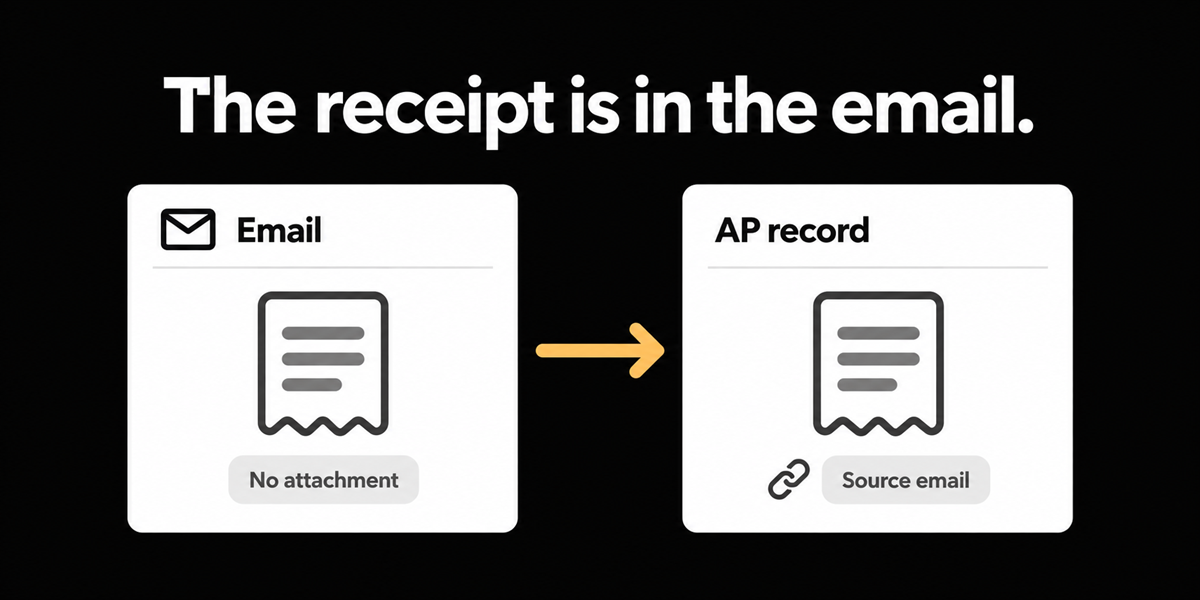
A NetSuite manufacturer with about ten approvers and Float cards processes a steady pile of shipping invoices, then trips on something smaller and stranger: airline receipts that arrive as email bodies with no PDF attachment. A transportation company on Great Plains or Business Central hits a cousin of the same problem: contracted driver invoices verified by an admin, then forwarded from the admin's address rather than from the vendor. In both cases the document is real. The attachment slot is empty, or the sender identity is the routing signal.
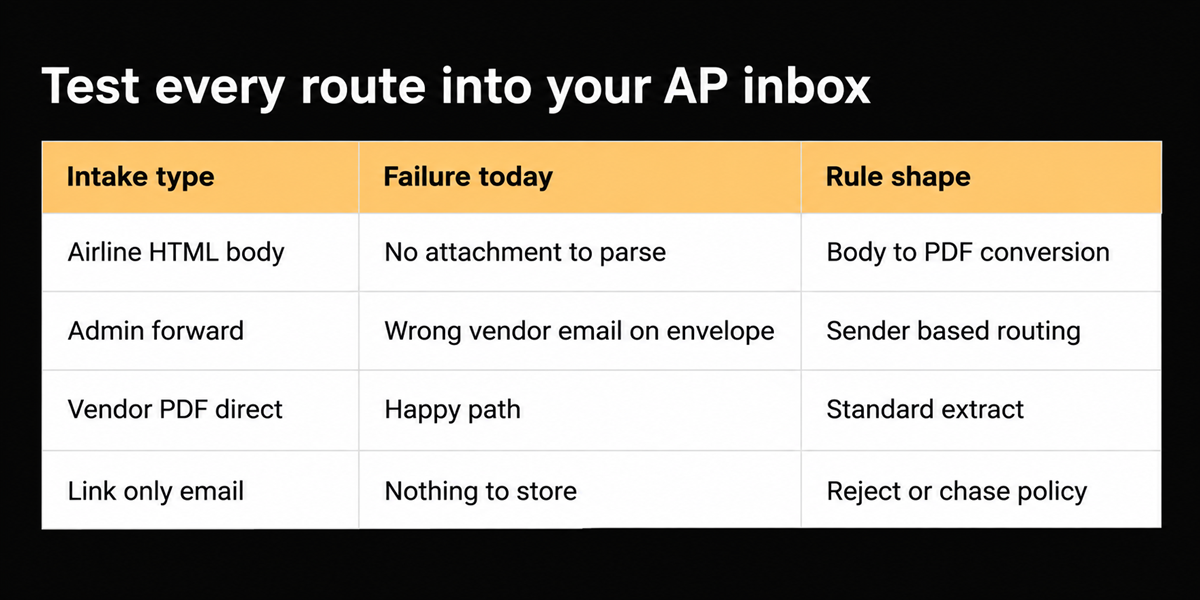
If your intake only reads attachments, airline style receipts never become bills. If your routing only reads vendor master email addresses, admin forwards never land in the right queue.
This matters most if corporate travel still produces HTML receipts, if admins verify third party invoices before finance sees them, or if you have already watched OCR tools sit idle because there was nothing to OCR until someone printed to PDF by hand.
Intake edges that do not look like AP strategy
These problems rarely make the RFP. They make Tuesday. Someone forwards a confirmation email. Finance prints it, or copies it into a Word doc, or saves a browser print to PDF, then uploads. The metadata is wrong. The duplicate detector may or may not recognize last week's forward. Approvers ask why the "invoice" looks like an email theme.
Sender based routing is the other half. When an admin mailbox is the trusted verifier for trucker invoices, the vendor domain is not who hit your AP address. Rules based on who the sender is decide whether the document is prechecked, needs coding, or should wait for a matching ticket. That is workflow design, not a capture party trick.
The second problem after you "fix" attachment only intake is silent loss. Emails without attachments disappear into a monitored inbox that your parser skips. Nobody opens an exception, because no record was created.
External grounding
The GBTA Foundation study with HRS (published 2015) estimated $58 and about twenty minutes to process an expense report for a single night hotel stay, with 19% of reports containing errors that cost more time to fix. It is an older study and hotel skewed. Treat it as a reminder that travel documentation is expensive even when the dollar amount is small. Airline emails with no PDF are how those minutes hide: conversion labour before AP labour.
Ardent Partners' Accounts Payable Metrics That Matter in 2025 puts average invoice cost at $9.40. A manually printed airline email can burn a chunk of that before extraction starts.
Build a tiny intake catalogue
List the last thirty non PO documents that were not clean vendor PDFs:
- Email body only (airlines, some bookings).
- Admin forward of a vendor PDF.
- Photo of a paper receipt.
- Multi attachment claim packs.
- Portal download links with no file.
For each category, write the rule you wish existed: convert body to PDF, route by sender, require attachment, or reject.
Reader usable test: for one week, tag every finance inbox item that needed a human to create a PDF before AP could start. That count is your business case.
How this shows up beside card feeds and SMS capture
Body conversion is not a replacement for receipt capture from employees who dine out. It is the sibling problem for documents that never touch an employee phone: carrier confirmations, booking engines, and admin verified vendor bills. Companies often buy an expense app for the first problem and still print the second problem to PDF by hand.
Sender rules also protect you from treating every forward as vendor truth. A verified admin forward can skip a trust check that an unknown Gmail forward should never skip. Write that difference down as policy before you automate it. Otherwise you will automate the wrong trust model.
Who this applies to: finance teams in manufacturing with corporate travel on NetSuite or similar, and transportation shops where dispatch or admin mailboxes are the real invoice gateway. If every vendor already sends clean PDFs to a locked AP mailbox, you may only need conversion for a handful of travel edge cases. Still worth doing. Those handful tend to sit with senior staff who hate print to PDF chores.
Pair this with duplicate detection. Forwarded airline emails get resent. Without content aware duplicate checks, you will pay the same itinerary twice under slightly different subject lines.
What we built for the unglamorous edge
We built email body to PDF conversion for attachment less receipts, and sender based routing rules so admin versus vendor identity can drive the path. In demos this shows up as reading the body and the attachment when present, and as rules based on who the sender is. It pairs with broader intake: dedicated org addresses, trusted senders, classification into invoices versus supporting documents.
We rejected waiting for airlines to standardize PDFs. They will not do it on your timeline. We also rejected forcing employees into an expense app solely because the receipt arrived as HTML. Finance still owns coding; intake should not invent a second mobile workflow just to capture a boarding confirmation.
Where this does not help
Body conversion quality varies by airline template and by how aggressive the email client is about clipping. Routing rules need maintenance when admins change roles or mailboxes. Portal links with no document still need a human chase. We will not pretend every HTML receipt becomes a perfect bill without review.
Deliberate choice: invest in intake edges that keep documents in the payable pipeline, not in a universal "understand any email" claim.
Vendor questions for demos: process an HTML only booking email end to end, then process an admin forward of a vendor PDF and show different routing. If both paths look identical, sender based control is not real yet.
Keep an eye on classification after conversion. A body that contains both a receipt and a long marketing footer should still land as one reimbursable or bill, with junk held as supporting text rather than as extra invoices. Classification mistakes recreate SharePoint style clutter inside the new system.
Close on the empty attachment slot
The receipt was in the body the whole time. The system just refused to look there. Convert what you can. Route by who sent it when that is the control. Then airline confirmations and admin verified trucker bills stop being craft projects before they become accounting.
Frequently asked questions
**Does body conversion replace employee expense apps?**
No. It removes a conversion step for documents that already arrive as email. Coding ownership is a separate design choice.
**Can we trust any sender who forwards a bill?**
No. Maintain trusted senders and admin roles. Routing is a control, not an open relay.
**What if the email has both a body and a PDF?**
Prefer the PDF when it is the legal document, and keep the body as supporting context when it adds booking detail.