A finance lead at a multi-division wholesale distributor stopped a demo on a line item and pointed at a vendor account number. Beauty and professional products. Sage in the stack. Four segment P&Ls that leadership actually reads. Portal-fetched invoices for some suppliers, email for others.
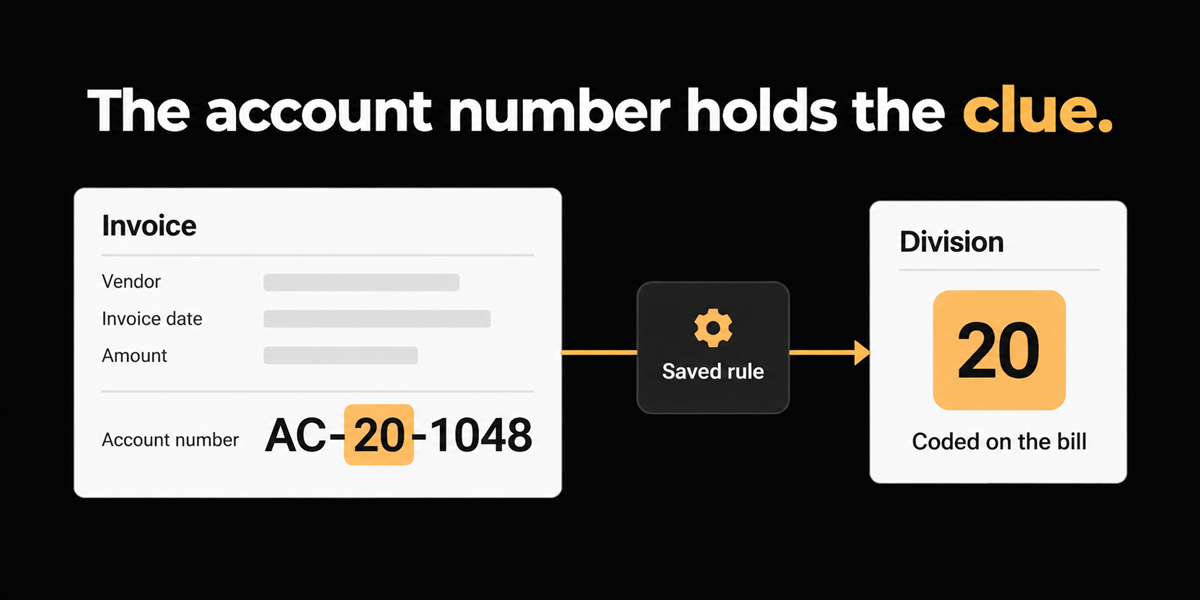
That Campar-style account was supposed to mean Professional: 20 CA. By default those lines should have landed there. Their question was not whether we could OCR the digits. It was whether the system would pick the division up if they instructed it to search that account pattern and force the coding.
Short answer: yes, when you write the rule. Division and cost center often live in vendor-specific codes, ship-to text, or line markers that never appear in a clean Department field. Generic dimension suggestions from history will guess. Instructable rules encode what the account number already meant to your team.
Who this applies to: multi-division or multi-location operators who need segment P&Ls, where the division signal arrives inside vendor account numbers, well or location text, or line labels rather than a standardized ERP dimension printed on every PDF.
Segment reporting fails quietly when the cue is tribal knowledge
Wholesale finance did not struggle because invoices were illegible. They struggled because the same vendor document could belong to Professional or another segment, and the cue was buried in an account number format the vendor invented for its own CRM.
If AP keys the easy fields and leaves class or division blank for later, segment income statements lie. If AP builds a tribal spreadsheet of account-number meanings, the knowledge walks out when that person is on vacation. New suppliers appear constantly. The buyer said they needed to set rules up themselves unless we planned to staff their vendor onboarding forever.
Oilfield and drilling demos rhyme with the same shape. Ship-to or well location on the invoice should cross-check to a cost center. Missing or wrong cost center is not an OCR miss. It is a business rule the tool never learned. When drilling spikes invoice volume from a quiet week to thirty documents a day across several entities, folklore coding does not scale.
Average AP cost is the wrong comfort metric
APQC's Open Standards Benchmarking measure for total cost to process accounts payable per invoice processed sits at a median of $6.00 across thousands of organizations in their database. That all-in figure covers personnel, systems, overhead, outsourcing, and related costs. It does not isolate wrong division, but wrong-dimension rework is exactly the quiet labor that keeps mid-market teams stuck near average.
Every invoice that posts to the wrong segment creates a second touch: reclass, argument with ops, restated P&L. Capture that "worked" still fails the close. If your segment pack is late because AP is fixing classes, you are paying the APQC median plus an unmeasured tax.
What we decided to put in the product
We treat division and cost-center logic as vendor-owned plain-language instructions, not as a one-time mapping spreadsheet living on a desktop.
In the wholesale demo, the instruction looked like: when this vendor's account number signals Professional, code 20 CA. In oilfield sessions, the parallel ask was: use location on the invoice to cross-check cost center when the printed center is missing or wrong.
We refused the path where only Finofo staff can maintain those rules. Self-serve authorship is the second beat of the product. New suppliers will keep arriving. The finance team has to own the map.
Staging backs the mechanism. Extraction rules live on the vendor profile, with whole-document and by-field instructions. Bill lines carry coding dimensions into the payable record. Multi-entity org switching exists when the books themselves are split across organizations.
What we did not build is a promise that portal-only vendors stop requiring someone to download the PDF. Portal fetch was an unmet pain in that conversation. Rules do not walk into a supplier website for you.
Division codes also change. When Professional stops meaning 20 CA, a human updates the instruction. That maintenance is deliberate. Frozen magic mappings drift into Silent Wrong, which is worse than an obvious miss.
A demo script you can force any vendor to run
Bring three real invoices where the division is not printed as a clean department field. Ask the software vendor to:
1. Point to the exact string that should drive the dimension (account number fragment, line marker, ship-to).
2. Write the rule in plain language on the vendor record while you watch.
3. Re-upload or re-process and show the dimension on the bill line.
4. Show how your team edits that rule next month without a professional services ticket.
5. Tell you honestly what happens when the supplier changes account-number formats.
If step 2 becomes "we will train the model on your history," ask how dirty history is prevented from becoming policy. If step 4 requires a ticket, you have bought a services dependency dressed as automation.
Optional sixth check for oilfield or project work: can ship-to or location text cross-check a cost center when the printed center is blank? If the answer is only GL resemblance, your wells will keep landing in the wrong bucket.
Where this does not help
We deliberately did not ship a full GL brain that invents segment logic without rules. If nobody writes "account pattern X means division Y," we will not pretend resemblance across unrelated vendors is governance.
We also do not erase portal homework. If the invoice only exists after someone logs into a supplier site and exports a file, that human step remains until the vendor changes behavior or you build a different intake.
NL rules are not a substitute for ERP dimension setup. Sage classes, Acumatica branches, NetSuite departments still need to exist as real values to post into. We route to your codes. We do not invent a chart of accounts.
And if two divisions share overlapping account-number patterns, the rule has to be written with enough specificity to avoid collisions. Vague instructions create confident wrong coding.
What "good" looks like after the rule exists
After the first Professional mapping is live, the test is boring on purpose. The next three Campar-style invoices should land on 20 CA without a Slack thread. When a fourth supplier appears with a different account scheme, finance should be able to clone the pattern in minutes, not open a project.
Track two operating metrics for a month: percentage of multi-division invoices that post with a blank or default class, and number of reclass entries whose only purpose is fixing division. If both fall, the rule is doing real work. If only OCR confidence rises, you optimized the wrong scoreboard.
FAQs
Can one vendor carry different division rules by account number?
Yes. That is the point of pattern-based instructions. The same supplier can sell into Professional and another segment. The account number (or line marker) is often the only reliable fork.
Does this replace approval workflows for cross-division spend?
No. Routing and approval policy are separate. Dimension coding gets the P&L right. Approvals still decide whether the spend should happen.
Close
The point of the program, in that wholesale room, was not prettier invoice images. It was getting Professional onto 20 CA because the account number already said so, every time, without a folklore spreadsheet.
When the division code is buried inside the vendor account number, teach the workflow the burial site. Hoping the next OCR pass feels lucky is not a control.