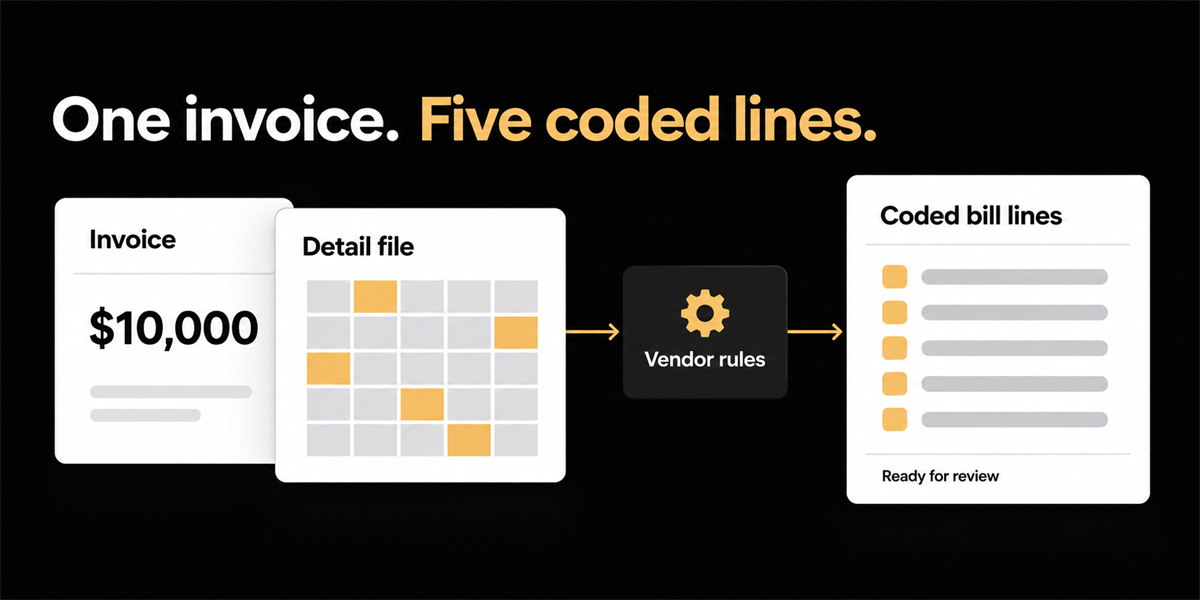
Some vendors send a single payable amount on the invoice and the detail you actually need for coding in a separate file. The invoice is perfectly readable. The accounting is not finished. Better extraction on the PDF does not fix this, because the PDF was never the problem. What fixes it is getting the allocation logic out of a monthly spreadsheet and attaching it to the vendor, so the breakdown arrives as coded bill lines instead of as homework.
The shape of the problem
A logistics vendor bills one number at the bottom of the page. Shipping, storage, fuel, accessorials, all of it collapsed into a single payable figure. The breakdown arrives separately as a system export.
In one case an accounting team walked us through, that export ran to roughly 90 rows and 27 columns, one line per shipment. Charge types sat in one set of columns. Amounts sat in another. Nothing in the file matched how the company books its costs.
The monthly ritual looked like this:
- Open the lump sum invoice.
- Open the export.
- Rebuild the allocation with SUMIFS across specific charge columns, or with Power Query if someone had built it properly.
- Fold 27 columns into roughly five expense categories, with some rows included only when the destination met a condition.
- Decide where each result lands in the general ledger and how it gets taxed.
- Key or paste the results into the ERP as bill lines.
A bookkeeper had built all of that logic into a spreadsheet and ran it every cycle. The spreadsheet worked. It was also the single point of failure for a recurring monthly close, and it lived on one person’s machine.
Why coding from history does not solve it
Most AP tools approach coding by learning from what people entered last time. Capture the header, capture whatever lines exist, suggest a GL account based on precedent, move on.
That works when the vendor’s document already resembles the journal entry. It does not work here, for two reasons.
First, there are no lines on the invoice to learn from. There is one number. History based coding can suggest an account for the lump sum, which is precisely the outcome the finance team is trying to avoid.
Second, and more awkwardly, history based coding copies what was typed last time rather than what was meant. If last month’s spreadsheet work was rushed, the pattern inherits the rush. The system becomes very good at reproducing an error nobody has noticed yet.
The second problem appears once you think the first one is solved. Even a flawless SUMIFS workbook does not know that a given charge column maps to a freight account under one entity and a different class under another. Someone still has to finish the accounting.
What this costs, and why it hides
Work like this rarely shows up in an AP metric, because the invoice is never technically an exception. It processes. It just processes slowly, through a person, every single month.
For context on what surrounding conditions look like, Ardent Partners’ Accounts Payable Metrics That Matter in 2025 reports an average cost of $9.40 to process a single invoice against $2.78 for best in class teams, and an average touchless processing rate of 32.6 percent against 49.2 percent for top performers. Invoices requiring manual allocation sit permanently outside the touchless share, no matter how good the rest of the stack is.
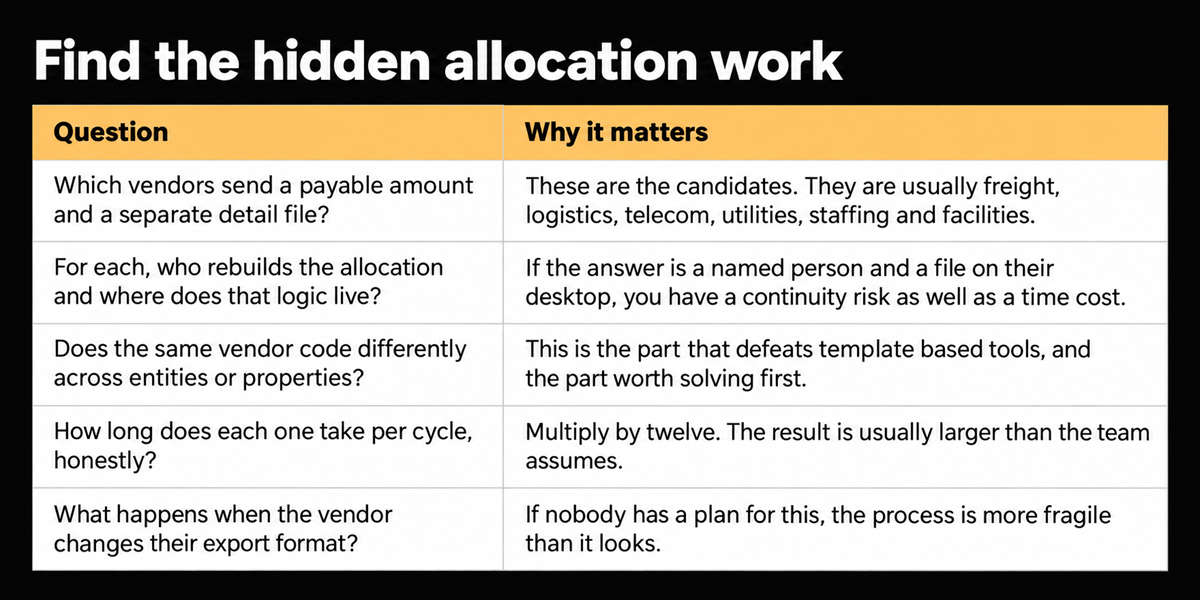
The more useful number is the one you already have. Count the vendors whose invoices cannot be coded without opening a second file, then multiply by the minutes it takes each cycle. Most teams have between three and a dozen of these relationships, and they are usually the largest suppliers, which is why the spreadsheet survives year after year.
Find yours in ten minutes
Run this over your last month of payables.
What we built, and the decision behind it
We did not build a better answer about the spreadsheet. A chat panel explaining what the file contains is not useful to someone who needs coded bill lines in an ERP.
What we built is a place to save the team’s allocation logic against the vendor, written as plain language instructions rather than as a configuration screen. Something close to: for this vendor, calculate five expense categories using these charge columns, exclude records of this type, apply this tax treatment to each result. Upload the document and the rules run. What comes out is structured bill lines inside the bill record, with GL and tax coding already populated and waiting for review.
The rules stay attached to the vendor, so the next export from them gets the same treatment automatically. The source document sits beside the result, and anyone on the team can open it and change something before approval.
Two design choices matter more than the feature itself. The first is where the output lands. The result has to be a bill the ERP can receive, with lines and coding, not an explanation of what the system thinks. The second is visibility on inference. Where coding was filled by resemblance to similar past invoices rather than by an explicit rule, we mark it, so a reviewer knows which fields deserve a second look.
In demos this looks deliberately unglamorous. A dense spreadsheet becomes five coded lines. The reaction is usually recognition rather than surprise, because the people watching have been living inside those formulas for years.
Where this does not help
A new vendor still needs a person to author the first rule. We are not claiming a model invents your five expense categories without being told what they are. What changes is that the logic gets written once and then stops being rebuilt from memory every cycle.
Native spreadsheet attachments can land as unclassified until they are available in a readable document format. If your process depends on dropping raw workbook files with no conversion step, that step still exists today.
Rules also do not replace judgement on exceptions. When the export format changes, and it will, somebody has to update the instruction. A bill should not post on autopilot because the vendor quietly redesigned their report.
The invoice can stay a lump sum
If your most painful vendors send a single payable figure and a file that contains the real accounting, the bottleneck is not extraction accuracy on the total. The bottleneck is that your allocation logic lives outside the bill, in a spreadsheet, maintained by one person.
Put the logic on the vendor. The invoice can carry on being one number.
Frequently asked questions
How do you code a lump sum invoice that has no line items?
You cannot code it from the invoice alone, because the detail is not there. The practical approach is to capture the allocation logic your team already applies to that vendor’s supporting file, store it against the vendor, and generate coded bill lines from it. The invoice total then reconciles against the sum of those lines.
Can AP automation read a CSV or spreadsheet attachment?
It depends on the tool and the format. Many systems are built around invoice shaped documents and treat a data export as an unclassified attachment. Ask specifically whether supporting files can drive coding, or whether they are only stored alongside the bill.
Why does the same vendor get coded differently across entities?
Because the cost belongs to different parts of the business depending on which entity or property received the service. This is normal in multi entity organisations, and it is the detail most template based automation handles poorly, since it assumes one vendor maps to one coding pattern.