Most expense tools assume the person who spent the money will install an app, photograph the receipt inside it, and choose the GL code. Only one of those three steps genuinely requires the employee. The photograph is the part nobody else can do. The coding is the part finance will redo anyway. Designing the workflow around that reality, rather than around app adoption, is what actually gets receipts in on time.
Two failures, in sequence
A finance lead at a wholesale distributor told us they had already shopped expense tools more than once. The pattern was the same each time. Open an app, take the picture inside the app, then sit there and categorise the spend.
Their employees were not going to do that. Many were not especially comfortable with new software and had no interest in becoming so. When someone did make the effort and coded the receipt, the codes came back wrong, and finance corrected them anyway.
So the promise that employees would self serve their expenses turned into a second job for accounts payable: chase the photo, then rewrite the coding.
That is two distinct failures arriving in order. The first is adoption. Field staff, warehouse teams and mixed age workforces will text a photo to someone. They will not maintain another login, another icon on their home screen and another interface they use twice a month.
The second is quality, and it only appears once adoption is solved. Even when the photo arrives, GL and tax decisions made by the person who bought the coffee are frequently wrong. Finance owns the chart of accounts. Pushing coding to the edge of the organisation does not remove that work, it just relocates the cleanup to a later date.
The corporate card version is the same story in a different order. The statement line is already in the system. The receipt is still in somebody’s jacket pocket, and someone in finance is sending the fourth follow up email.
What an expense report actually costs
The most widely cited figure comes from the GBTA Foundation’s study on expense reporting practices, which put the average cost of processing a single expense report at $58 and the time at around 20 minutes. It also found that roughly 19 percent of reports contain errors or missing information, each taking a further 18 minutes and about $52 to correct.
Two caveats worth stating plainly, because most articles quoting these numbers do not. The study is now over a decade old, and the dollar figures are American. Treat them as a sense of proportion rather than a precise benchmark for a Canadian mid market team in 2026.
Even discounted, the shape of the finding holds up. Correction is the expensive half. A company processing 500 reports a month is reworking roughly 95 of them, and that rework is pure overhead created by the original capture design. Whatever the true figure is for your team, the ratio between doing it once and doing it twice is the number that matters.
What we built, and why the coding stays with finance
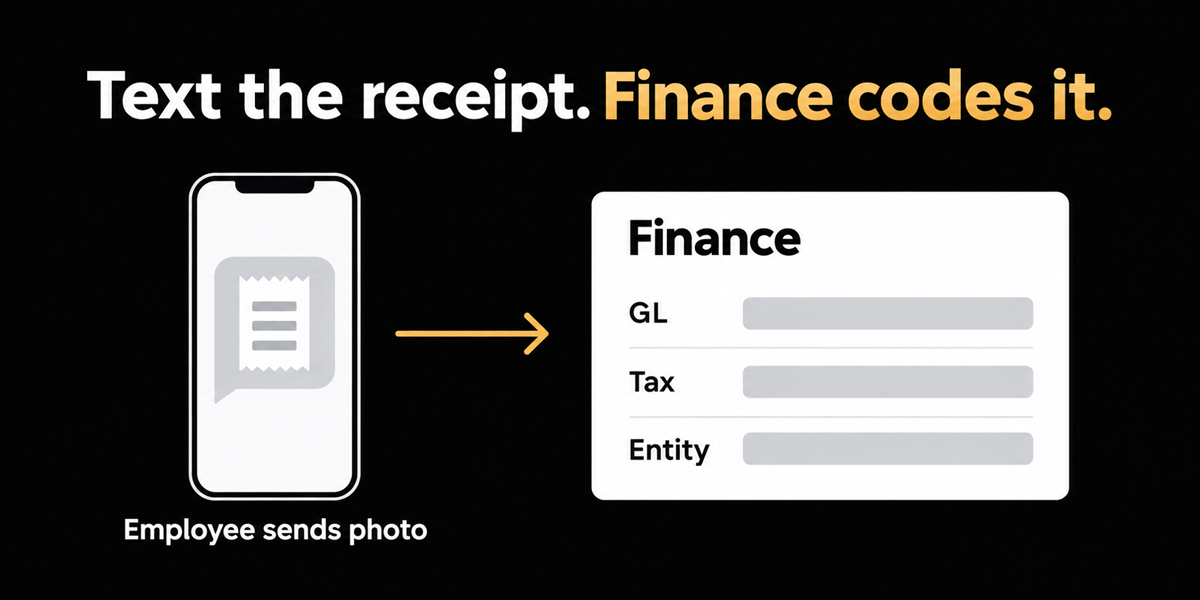
The company gets a dedicated number. The employee texts a photo of the receipt. That is the entire employee workflow. No app, no login, no category picker.
Finance owns coding. GL, tax, entity and policy checks stay with the people who will post the entry and answer for it later. Email forwarding exists for people who live in their inbox instead. Lost receipt declarations sit beside the same process for when the paper is genuinely gone. When the spend was on a corporate card, the receipt meets the transaction later rather than being chased separately.
The design decision is simply this: using our software should not be the price of getting a receipt into AP. Capture belongs in whatever channel people already use without thinking. Accounting belongs where accounting already happens.
This is not the same as supporting SMS
Plenty of tools accept a text message. That is a pipe, and it is not the interesting part.
The question is what happens after the photo arrives. If the text drops the employee into an app to finish categorising, all that changed is which button they press first. If finance still re-keys every category afterwards, none of the rework has gone anywhere. The distinction is whether the workflow expects the spender to touch the chart of accounts at all.
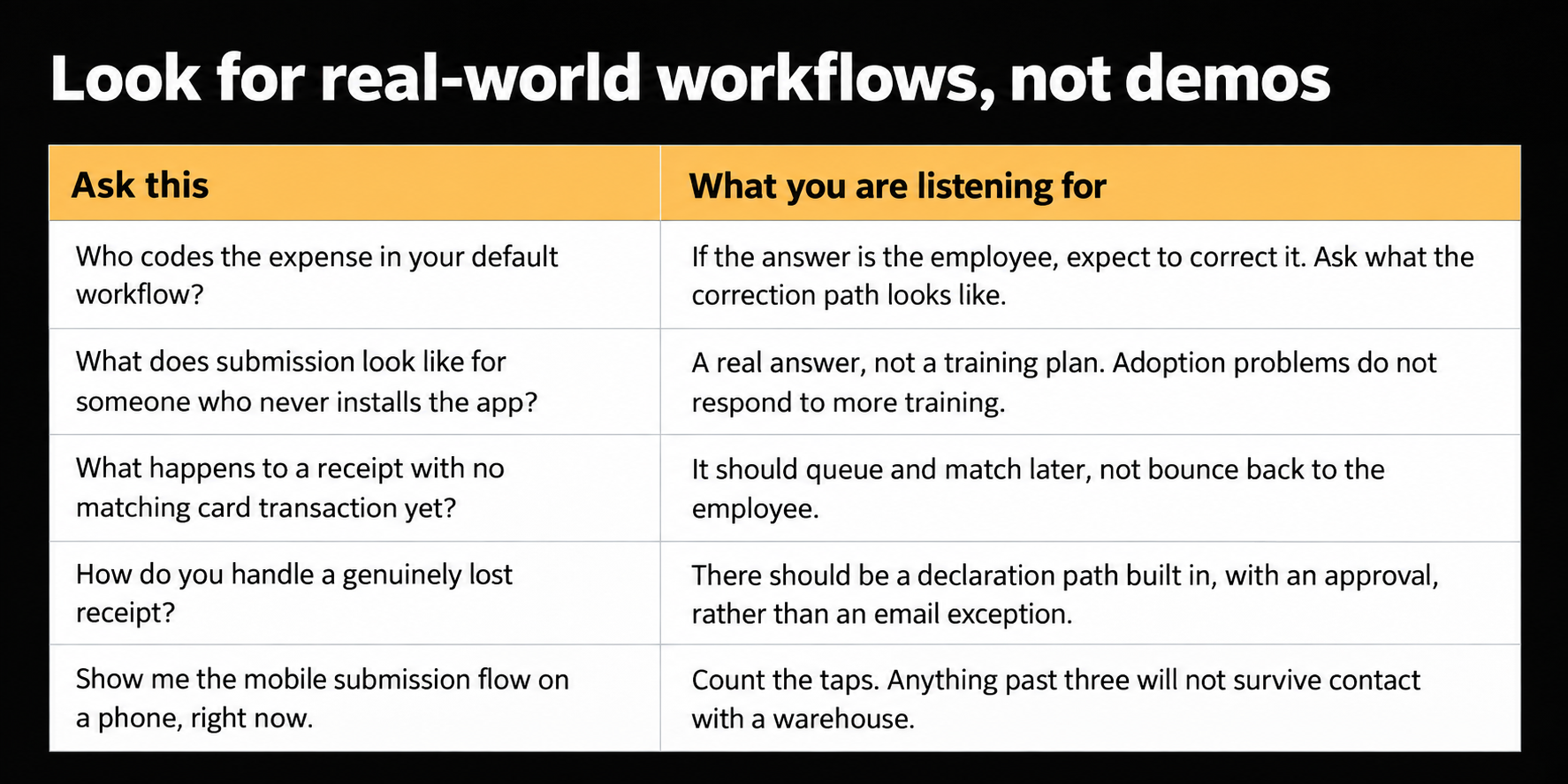
Questions worth asking any expense vendor
Where this does not help
Texting a photo does not teach policy. Spend that breaks the rules, alcohol restrictions, and receipts missing merchant detail all still need finance judgement or a clear lost receipt path. Easier capture surfaces those cases sooner. It does not resolve them.
It is also not a reason to choose or avoid a particular card programme. If the business wants a specific issuer for banking, credit or rebate reasons, receipt capture should not be the deciding factor.
For teams that need the full product localised for French speaking submitters, that gap is real today and worth raising with us directly rather than discovering it after rollout.
And if nobody sends the photo, nothing appears by magic. The channel is easier. Accountability for using it still belongs to the team and their managers.
Start from who will actually do the work
If your evaluation checklist asks whether employees can submit from mobile, the more useful next question is who is supposed to code it, and what happens when they get it wrong.
For most Canadian mid market finance teams, the honest answer to the first half is finance. Build the capture path for that reality. Let people text a photo, and keep the accounting with the accountants.
Frequently asked questions
Why do employees avoid expense apps?
Friction and frequency. An app used twice a month never becomes a habit, and it competes with a phone already full of software. Field, warehouse and trade based teams in particular will use a channel they already use daily, which is usually messaging, and will not maintain a separate login for occasional admin.
Should employees code their own expenses?
Usually not. The person who made the purchase rarely knows the chart of accounts, and finance ends up reviewing the coding regardless. Asking them to do it adds a step for them and a correction step for finance, which is the worst of both.
How much does processing an expense report cost?
The GBTA Foundation study most often quoted puts it at around $58 per report and 20 minutes, with about 19 percent of reports needing correction at a further $52 and 18 minutes each. Those figures are American and over a decade old, so use them for proportion rather than precision, and measure your own rework rate if you want a real number.