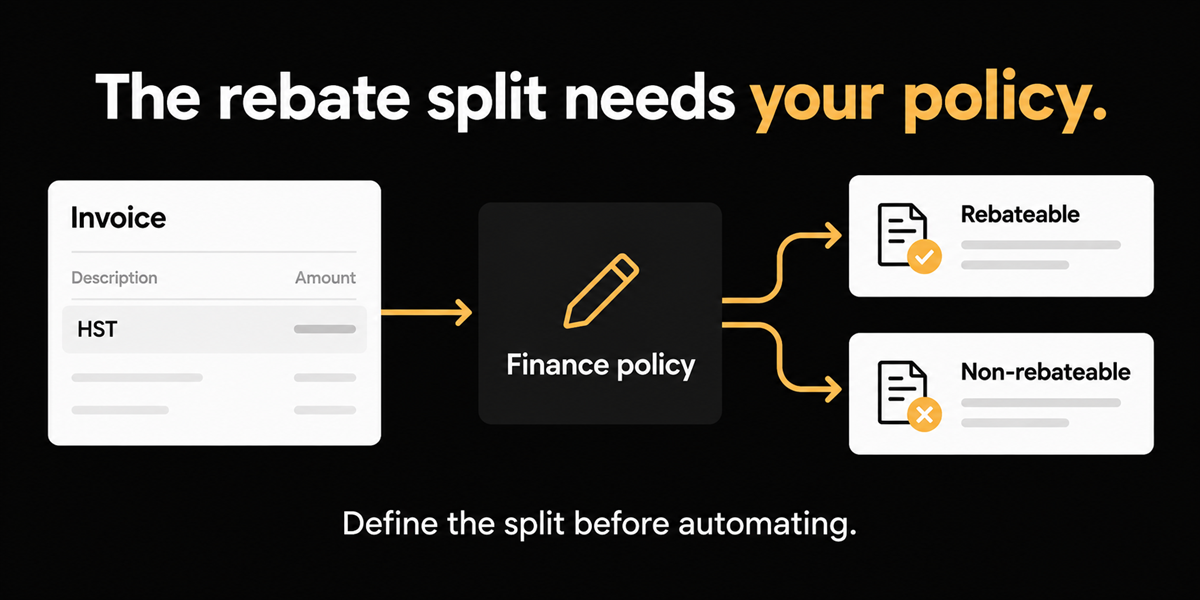
A senior financial analyst at a Canadian nonprofit medical association on QuickBooks walked through a tax shape that commercial AP tools treat as a rounding error. The invoice shows 13% HST in Ontario like any other bill. For a public service body, a portion of that tax is rebateable and a portion is not. In their QuickBooks setup, the rebateable slice goes to an accounts receivable style tracking account, and the non rebateable slice loads into expense with the net cost. On a simple illustration they used: $100 taxable, $13 HST (they also talked through an 80% rebateable example on a $10 tax line). The AI cannot see that split on the PDF, because the PDF never states it.
There is no honest product that invents your PSB rebate arithmetic from a standard HST line alone. Automate extraction, coding, and approvals. Keep the rebate split as a scoped manual step or a custom rule only after your finance team systemizes the logic.
This matters most if you are a Canadian charity or qualifying nonprofit claiming a public service bodies rebate, if invoices arrive with ordinary HST or GST presentation, and if your books already use special tax codes to park rebateable amounts.
What the invoice shows versus what the rebate requires
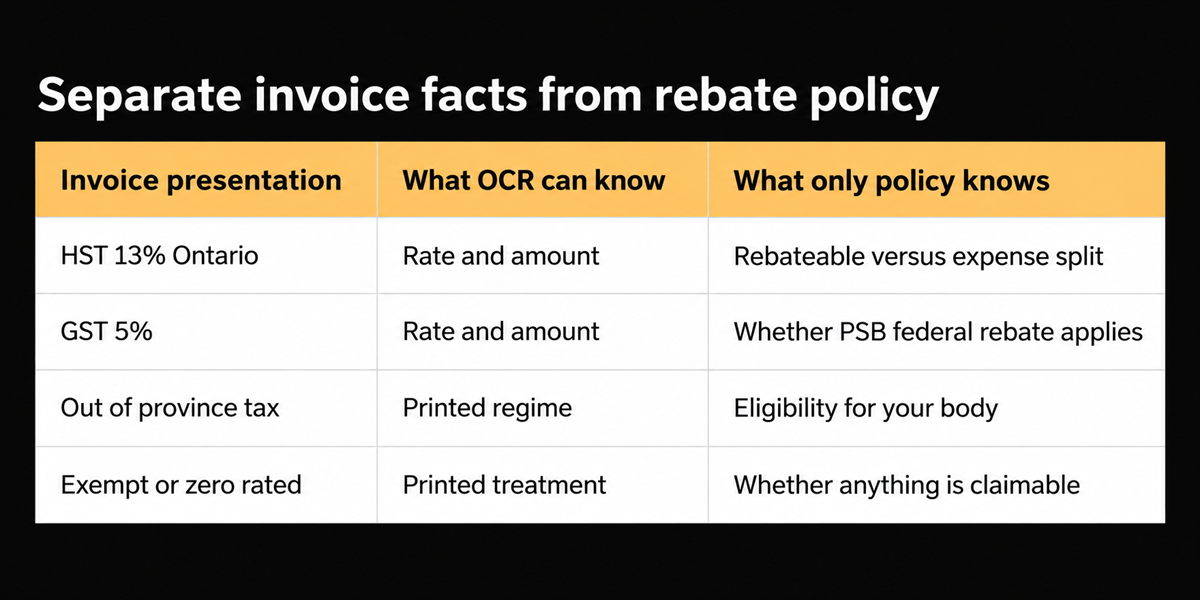
Commercial vendors bill nonprofits like any other customer. Subtotal, HST, total. The CRA public service bodies rebate is a claim process with rates that depend on the type of body and the province. Per CRA guidance for charities and qualifying NPOs, the federal part is generally 50%, and the provincial part for Ontario residents is 82% of the provincial part of the HST (other provinces differ; municipalities and selected bodies have different factors again). Those rates live in CRA publications such as RC4034 and the GST/HST public service bodies rebate pages on canada.ca. They do not live in the supplier's PDF.
So the AP problem becomes: take a normal 13% HST line and explode it into the accounts your rebate process needs. Ontario versus out of province treatment can differ for the same organization depending on eligibility. Clerks today pick a tax code manually. That is not laziness. That is the only place the policy exists.
The second problem is false automation. A vendor that promises "AI tax coding" will confidently post 13% to a standard ITC style treatment and quietly break your rebate receivable. Worse, it will do so at volume.
Grounding in CRA rules, not in marketing math
Use the CRA rates as your external anchor, not an AP software survey. Charities and qualifying NPOs: 50% of the GST or federal part of HST; Ontario provincial part rebate factor 82% for those bodies as published by CRA. Always confirm the current factor for your body type and province in RC4034 or the CRA PSB pages before you encode anything. Rates and eligibility change by category (municipality, hospital authority, school authority, and so on).
Ardent Partners' $9.40 average invoice cost (AP Metrics That Matter in 2025) is secondary here. Nonprofit finance cares more about rebate integrity and audit support than about shaving average commercial AP cost. Still, every invoice that needs a manual tax code is a recurring touch you should design for, not apologize for.
A worksheet finance can own before software shows up
- List your entity's PSB category and province of residence.
- Write the CRA rebate factors you actually claim (federal and provincial parts).
- For Ontario 13% HST invoices, document how you split rebateable versus expense amounts into GL accounts today.
- Note out of province rules (for example, treatments that do not qualify the same way).
- Decide which invoice types are always manual versus candidates for a saved rule once stable.
Reader usable without buying: encode the split in a one page finance SOP with examples at $100, $1,000, and $10,000. If two accountants disagree on the SOP, no software should automate yet.
What we automate, and what we refuse to invent
We automate extraction, line coding support, approvals, and Canadian tax group handling for coded tax treatments. Staging shows tax breakdowns and reconciliation style surfaces on invoices. What we refuse to invent is a default that magically partitions a standard HST line into PSB receivable and expense without your rule. In demos we have said the quiet part: there is no solution that does that automatically from the invoice alone, because the partition is not on the document.
That honesty is the product decision. Overpromising rebate automation would win a meeting and lose an audit. The deliberate choice is to keep rebate arithmetic customer specific: tax groups and workflows you configure once the logic is systemized, including manual selection where that remains the control.
Who this applies to is Canadian nonprofit and association finance, not every Canadian mid market AP team. Commercial ITC treatment is a different conversation covered in our tax variance writing.
Where this does not help
If you want a button labelled "PSB" that always splits 13% correctly for every charity in every province without configuration, we will not ship that fantasy. If your rebate logic changes by program funding source in ways that are not documented, fix the documentation first. If board expenses arrive as claim packs with airline and mileage attachments, document logistics is a parallel problem (see our SharePoint inbox piece) and does not remove the tax policy step.
Who this applies to also includes finance teams at qualifying NPOs that are mid migration from desktop QuickBooks habits into a tighter AP workflow. If your rebate claim is prepared by an external accountant quarterly, still encode the monthly AP treatment so the accountant is not untangling a year of standard ITC posts.
Ask vendors in demos to refuse the magic button on purpose. The ones who rush to promise full PSB automation without seeing your SOP are the ones who will mispost with confidence.
Close on the 13% line
The invoice will keep printing ordinary HST. Your books will keep needing an extraordinary split. Put human designed logic where it belongs. Automate everything that is actually on the page. Leave the rebate partition to a rule you wrote, or to a clerk following an SOP you trust. Either is better than a confident wrong post.
Frequently asked questions
**Can tax groups encode our PSB split?**
Often yes, once you define them the way you did in QuickBooks. The group is configuration. It is not inference from a blank PDF field.
**Why will models not learn the split from history?**
They might learn a pattern and then apply it to an out of province invoice where eligibility differs. Policy boundaries beat pattern matching here.
**Where do we verify current rebate factors?**
CRA's GST/HST public service bodies rebate materials and guide RC4034. Confirm body type and province before encoding.