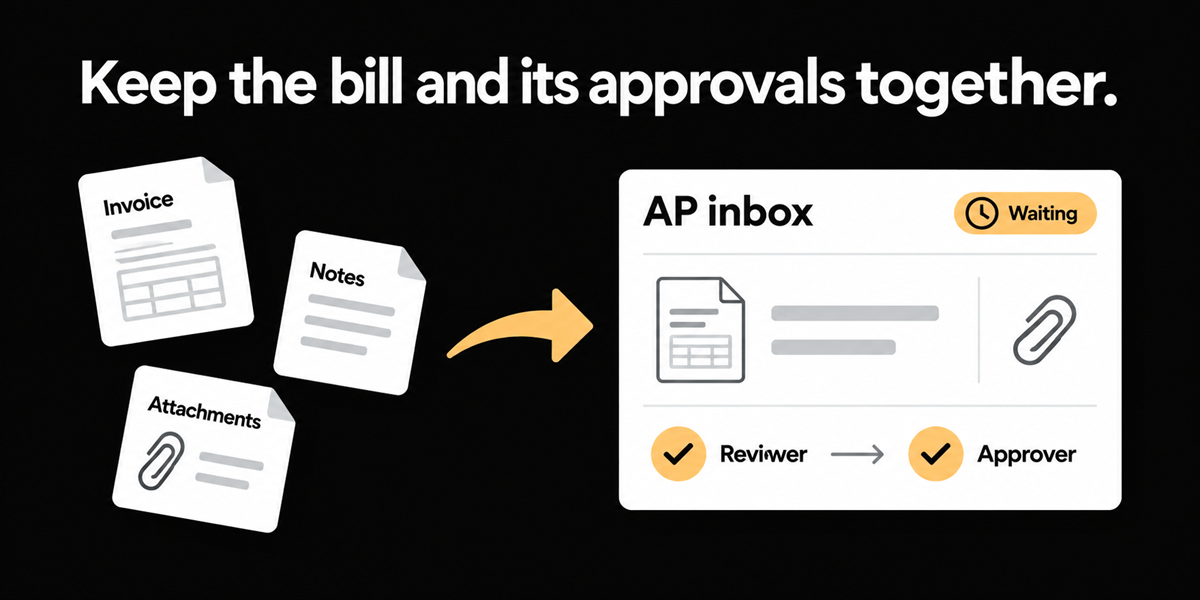
An insurance restoration company on QuickBooks Online, roughly forty users in the approval orbit, described the path out loud: match the invoice to the PO, enter it into QuickBooks, upload it to SharePoint, then wait on two approvals for payment, project manager then supervisor. A nonprofit medical association on QuickBooks said the quieter version of the same pain: the whole storage of documents in SharePoint was taking up the majority of their time. Budget holders forward invoices by email. Clerks file the PDF, the coding email, and the attachments into folders. Approvers cannot see how old the request is without opening a maze.
SharePoint is a document library. It is a poor AP inbox. Approvals, SLA age, supporting documents, and the invoice object need to live together, or clerks will keep doing logistics instead of accounting.
This matters most if approvals still happen by email or SharePoint, if supporting documents routinely travel separately from the invoice PDF, and if your AP metrics cannot answer how long a bill has been waiting on a named person.
Document logistics is the process pain, not OCR accuracy
Teams evaluating AP software often start with capture quality. In these organizations the capture was not the bottleneck. The bottleneck was assembling an audit pack: invoice, packing slip or job photo, email with GL instructions, maybe a claim form with five attachments. Then chasing two approvers who never see a queue age. Then filing the trail somewhere auditors can find later.
When a clerk says SharePoint is most of their time, they are not complaining about search. They are describing a system of record that was never designed for payable state. Folders do not know that an invoice is four days past terms because a supervisor did not open an email. Folders also do not prevent the same PDF from living in three places with three slightly different file names.
The second problem appears after you "fix" intake with a shared mailbox. Email is still not a workflow. The attachment arrives. The coding instruction arrives in a different thread. The approval arrives as a reply without the PDF. SharePoint becomes the attempt to glue those pieces together after the fact.
What surrounding AP conditions look like
Ardent Partners' Accounts Payable Metrics That Matter in 2025 puts average invoice cycle time at 9.2 days and average processing cost at $9.40, with touchless processing averaging 32.6% of invoices (survey of 212 AP professionals, US heavy). Approvals that hide in email and file shares are a direct drag on cycle time even when extraction is fine. If your team cannot see queue age by approver, you are managing AP with inbox search.
Use the benchmark as context, not as a promise. Measure your own median hours from invoice receipt to first approval action, and from first approval to payment ready. SharePoint heavy processes usually fail the first number.
A diagnostic you can run this week
- Pick ten invoices paid last month that needed supporting documents.
- For each, count systems touched: email, SharePoint, ERP, chat, paper.
- Note whether the approver saw SLA age without asking AP.
- Note whether coding instructions lived in the PDF, in an email body, or in a clerk's head.
- Ask one approver how they know what is waiting on them today.
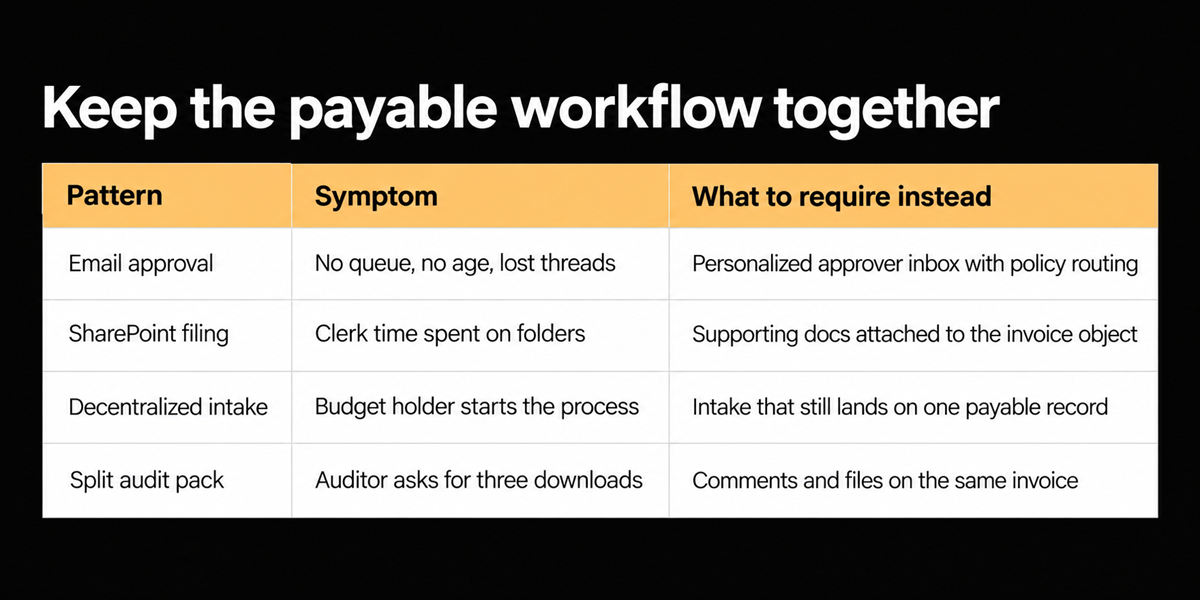
One more tell: if AP cannot produce an aged approvals list by person without exporting a folder inventory, you do not have an AP inbox. You have a filing habit.
Reader usable test without buying: for one week, forbid new AP folders in SharePoint and force every supporting file to be stored against a single invoice identifier in whatever tool you have. The breakage you see is the requirements list.
What we built instead of a prettier folder tree
We built a personalized approval inbox, object level comments on invoice fields and lines, and an unclassified supporting document store that sits on the same invoice object. Staging verifies commenting and collaboration on invoices, unclassified classification surfaces, and the broader invoice workflow. Remittance and ERP posting still apply after approval. The product decision is that the invoice is the system of record for the audit pack, not a PDF that later gets filed.
We rejected "better SharePoint integration" as the primary answer. Connecting a folder tree to an ERP still leaves approvers blind and clerks doing document logistics. We also rejected making every employee a full ERP user so they could approve inside QuickBooks. Project managers in restoration should see what they need to approve without living in the general ledger.
Where this does not help
Email body coding instructions that never appear on the PDF are still a product decision: append the email as a supporting document and make a human apply the codes, or require the instruction on the document. We are not pretending the model should silently trust a side email as posting truth without a design choice. Canadian data residency and payment rails matter for some buyers; document logistics alone will not satisfy a treasury requirement.
If your only problem is archival storage after payment, SharePoint may be fine. This post is about the live payable, not the dead file.
Who this applies to beyond the two scenes above
If you run professional services with partner approvals, associations with board related spend, or any multi location operator where site managers photograph work and email finance, you are in the same shape. The industry changes. The document logistics rhyme.
Also ask whether remittance advice and payment confirmation need to stay coupled to the same object after approval. An inbox that dies at "approved" and leaves payment in a side process will recreate a smaller version of the SharePoint problem one step downstream.
If you are mid evaluation, ask vendors to show an invoice that still has an unresolved comment, an aged approval, and a supporting PDF attached, all without leaving the record. If they switch to a slide about connectors, you have your answer.
Close the folder tab
The restoration clerk who matches, keys, uploads, and waits is not failing at AP. The stack asked them to be a librarian. Put approvals, comments, and supporting documents on the invoice. Then SharePoint can go back to being a library for things that are not trying to get paid.
Frequently asked questions
**Can approvers still get an email notification?**
Yes. Notification is fine. The approval action and the document trail should still resolve against the invoice object, not against a free floating message.
**What happens to non invoice PDFs in a claim pack?**
They should classify as supporting or unclassified documents attached to the payable, not as fake invoices that pollute matching.
**Is this only for nonprofits and restoration?**
No. Any team where budget holders start invoices by email and clerks reassemble files will recognize the pattern, including professional services and associations.