Reimbursable claims are approved, posted to your ERP and paid back to employees through the same workflow as vendor invoices.
Each employee is paid through their linked vendor record. Approved claims can be paid in a reimbursement batch, paid individually or marked as paid outside Finofo.
A submitted claim follows the Expenses approval policies. A policy can test Total amount, Vendor, Label and Currency, for example sending any expense over 100 to two approvers in turn; anything no policy matches goes to the default approval group. Approvers act from My tasks, where the item opens as an Expense approval. They can review each expense, approve, send it back or reject it with a reason, and nobody approves their own expenses.
An approved claim becomes a payable. Its ERP section shows the destination ERP and a note that the expense has not been posted yet until you click Post to ERP. The claim posts against the employee's vendor record.
On the Approved tab, ticking claims shows a selection bar with the count, an X to clear the selection and five icon buttons: Send for approval, Post to ERP, Pay, Cancel expenses and Delete. Reimbursement batches are listed in Expenses > Batch payments, with the same status tabs as vendor batches and the columns Reimbursables and Payees. Batches are approved and released in Finofo Payments, and paid claims move to In Payment, then Paid.
1. Open My tasks and select the expense approval.
2. Click Open document to check the receipt, amount, coding and Memo, or Approval steps to see who else approves.
3. Approve the claim, or reject it with a reason.
1. Open Expenses > Reimbursables, select the Approved tab and tick the claims to pay.

2. To post a single claim, open it and click Post to ERP in its ERP section.
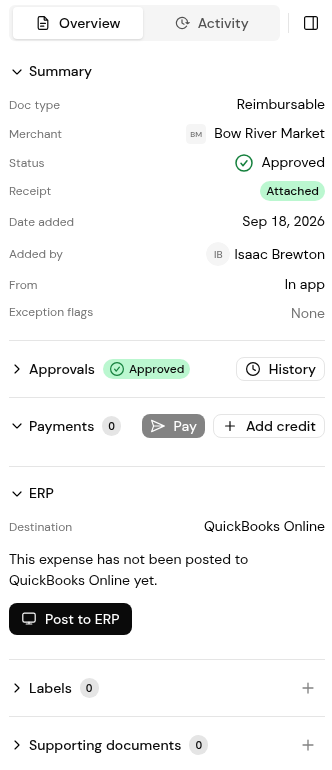
3. Click the Pay icon on the selection bar to pay the ticked claims. It is the paper plane, the third of the five icons.

4. Open Expenses > Batch payments to follow reimbursement batches by status.

5. Approve and release the batch in Finofo Payments. Paid claims move to Paid.
1. As an administrator, open Settings > Approval Workflows, select Policies and then Expenses.
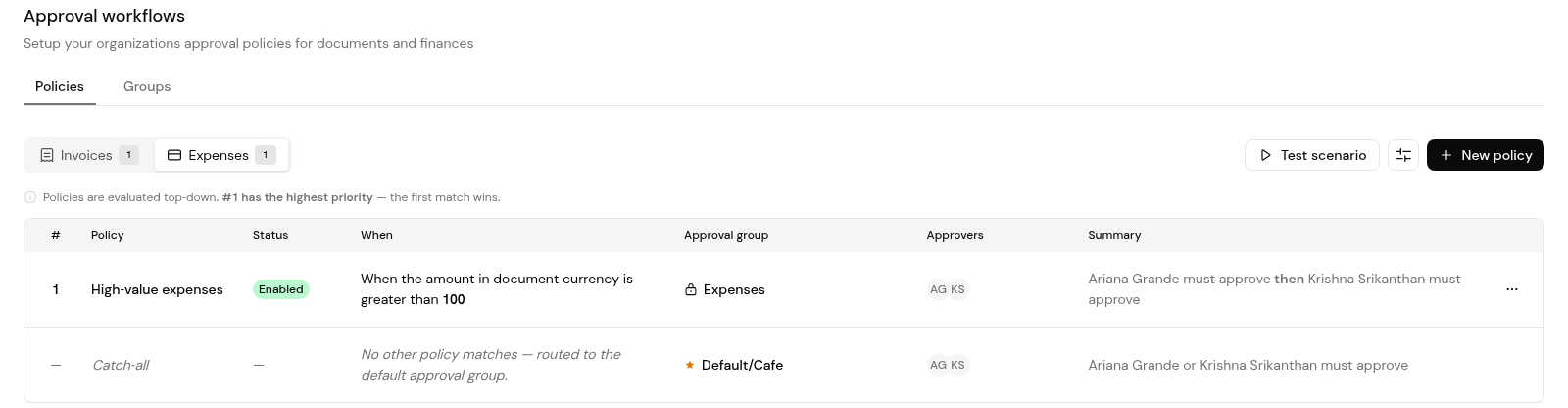
2. Check each policy's condition, approval group and approvers, and the catch-all row for everything else.
Through the vendor record linked to them in Settings > Submitters, to that record's approved payment method.
No. Approved claims can be paid in a batch, paid individually or marked as paid outside Finofo.
In Finofo Payments, from the link on the batch's Status pill.
Yes. Approvers can approve in bulk as well as one claim at a time.


