Finofo works around the systems you already run. Your ERP stays your system of record, your bank stays your bank, and your corporate cards stay in place.
Finofo captures, codes, matches and approves the work, then sends clean entries back to your ERP.
Finofo does not replace your ledger, bank or card program. It sits between them and handles the work that usually happens in inboxes and spreadsheets: intake, reading, coding, matching, approval, payment preparation and reconciliation.
Each system below shows what stays there, followed by what Finofo does.
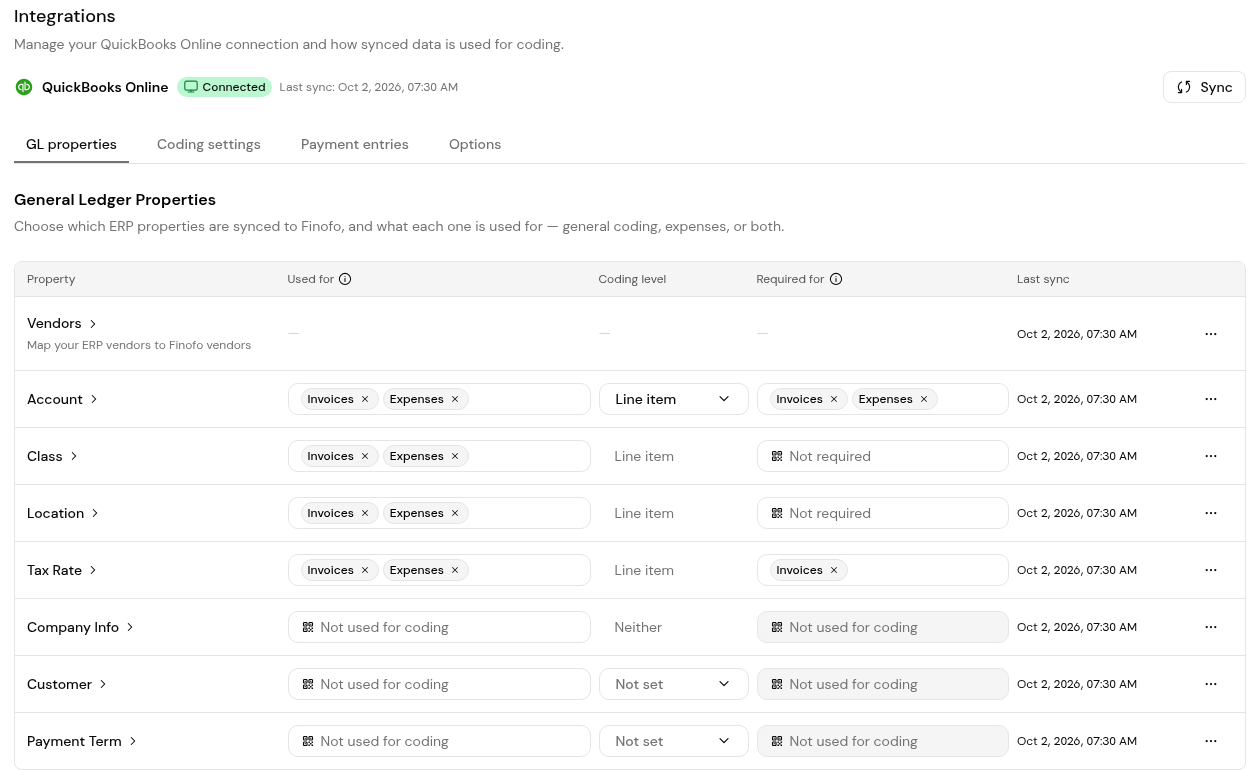
1. Open Settings > Integrations. The ERP integration card shows Connected, the last sync time and a Sync button.
2. On GL properties, check which properties sync and what they are used for. Account is required for invoices and expenses, Tax Rate is required for invoices, and Class and Location are optional.
3. On Payment entries, map each Finofo currency account to its ERP GL account. Finofo posts payment entries with these accounts when batches are paid out.
4. Under External Payments on the same tab, choose the GL accounts allowed for Cheque, Bank Payment, Credit Card and Vendor Credit. These are used when a payment is recorded outside Finofo.
5. Open Settings > Documents and choose Automatic posting or Manual posting under Approval and posting.
1. Open Settings > Cards to see each corporate card with its Status, Approval setting, Currency, Expiry, Holders and GL accounts.
2. Click Add card to add a card, then bring in its transactions from a bank connection or by uploading card statements.
No. Your bank stays. Pay through Finofo Payments or keep paying from your existing system.
Yes. Finofo posts approved bills to your ERP and records them as paid outside Finofo, while payments continue from your existing system.
They import from your ERP, so coding in Finofo uses the same values as your books.
No. Finofo works with the corporate cards you already use.


