An invoice can be paid in parts. Until its balance reaches zero it stays on the In Payment tab, and its Payments panel shows Partially paid with every payment made so far.
Amt. outstanding in the invoice list shows what is still owed. A supplier credit applied with Add credit reduces the balance too.
A partial payment happens when a payment run pays less than an invoice's outstanding amount. Each vendor row in a payment batch shows Amount outstanding next to Amount to pay, so the gap is visible before the batch is approved. A batch in which only some payments go through shows on the Partially Paid tab of Batch payments.
Every payment is recorded on the invoice. The Payments panel shows the invoice total, a status such as Partially paid or Paid fully, and the Payment history: one row per payment with its method (for example Cheque), amount, a label such as Payment declared, and the date and time. The balance stays outstanding until a later payment or a credit covers it.
Supplier credits count toward the same balance. You apply a credit from the invoice with its amount and credit note reference, and you can remove it later; the change is kept in the invoice history, and Finofo shows the effect on the outstanding amount. When payments and credits together equal the invoice total, the invoice can move to Paid.
1. Open Documents > Invoices and select the In Payment tab. Compare Amt. outstanding with Amt. total.

2. Use Last payment date to see when each invoice was last paid.
1. Open the invoice by clicking its number.
2. In the Overview panel, go to Payments. Check the status, the amount and each row of the Payment history.
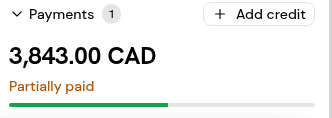
3. Open the Activity tab to see when each payment was completed.
1. In the invoice's Payments section, click Add credit.
2. Enter the credit amount and the credit note reference, and save.
3. Check that Amt. outstanding has dropped by the credit amount.
An invoice moves to Paid only when payments and credits cover it in full. Until then it stays In Payment, with Partially paid in its Payments panel.
Yes. A payment in a batch can be split across more than one of the vendor's approved payment methods.
A payment notification with a remittance PDF that lists earlier payments, credits, this payment and the remaining balance.
Yes. Credits can be removed. The change is kept in the invoice history, and the outstanding amount updates.


