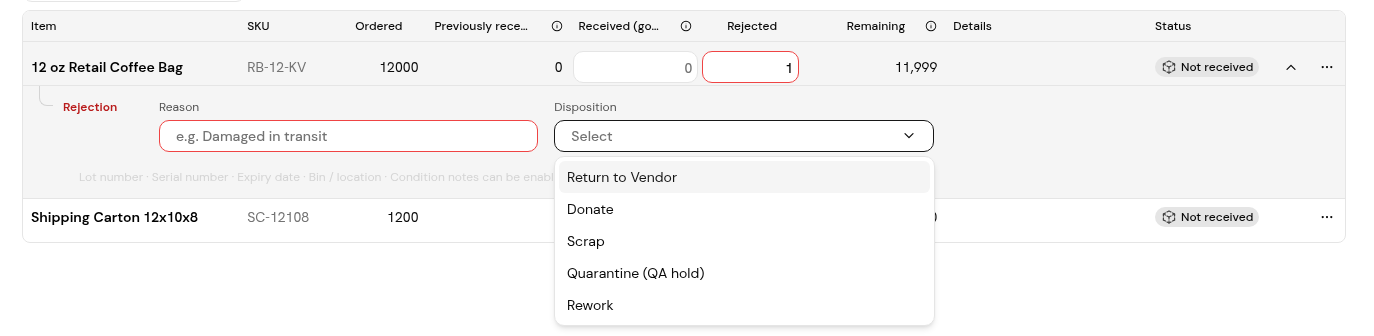
On a goods receipt, record rejected units with a Reason and a Disposition such as Return to Vendor, so the PO and vendor claims stay accurate.
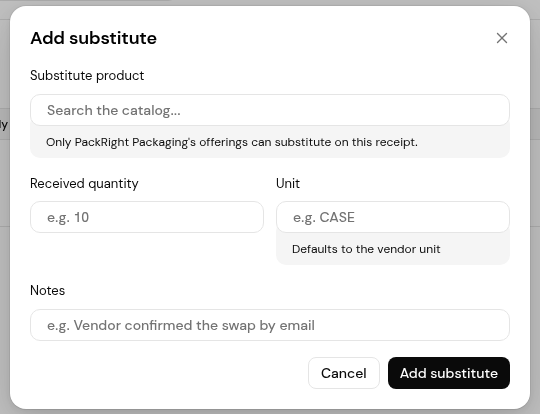
When the vendor sends a different product, use Add substitute on the line it replaces. Only that vendor's catalog offerings can be used.
"Every rejected line needs a disposition and reason before the receipt can be saved." The dispositions come from Settings > Receiving: Return to Vendor, Donate, Scrap, Quarantine (QA hold) and Rework. Rejected units do not count as received.
A substitute counts against the ordered line in that line's base unit. For example, 2 bags of a substitute coffee at 60 kg a bag count as 120 kg, and the dialog shows how much remains. When the receipt is posted, the PO's received quantities include the substitute.
1. On the receive form, enter the Rejected quantity on the line.
2. In the rejection block, enter the Reason and choose a Disposition.
3. Click Post receipt.
1. On the line the substitute replaces, open More options and choose Add substitute.
2. In Substitute product, choose the item. Only the vendor's offerings are listed.
3. Enter the Received quantity. Unit defaults to the vendor unit.
4. Check the converted quantity and what remains, add Notes if needed, then click Add substitute.
5. Click Post receipt.
Every rejected line needs a Reason and a Disposition first.
Only the vendor's own offerings can substitute on its receipts. Add the product as an offering for that vendor in Products & services.
No. Only units received in good condition count on the PO.


