Help Centre
›
Matching and reconciliation
›
Resolve Price, Quantity and Missing Receipt Mismatches

Resolve Price, Quantity and Missing Receipt Mismatches

Read Finofo's reconciliation screen and decide each line with Pay accepted quantity, Pay PO price, Accept variance, Code as expense or Unmatch line.

At a glance

Click Open reconciliation on the invoice to compare Ordered, Accepted and Billed for every line.

Decide each line in Needs review from its ... menu, and when every line is decided, the PO reconciliation resolved checklist step completes.

How It Works

The PO reconciliation page shows the vendor, goods receipt and invoice, and a strip with Reconciled (for example 3 of 3), Ordered, Accepted, Billed and Payable. Each line shows its quantities, unit price, payable amount, variance and status. Lines within tolerance are Matched; the rest sit in Needs review.

There is no hold option. A line billed before the goods arrive shows Awaiting receipt and waits until a receipt is posted or someone decides it. Decisions are explicit and recorded, which supports audit and vendor discussions.

Decide Each Line

1. From the invoice, click Open reconciliation.

2. Review the Needs review group. Compare Ordered, Accepted and Billed, the unit price and the variance.

3. Click Show why on a status to see the reason.

4. Open the ... menu on the line and choose an action. Decided lines move to Matched and resolved.
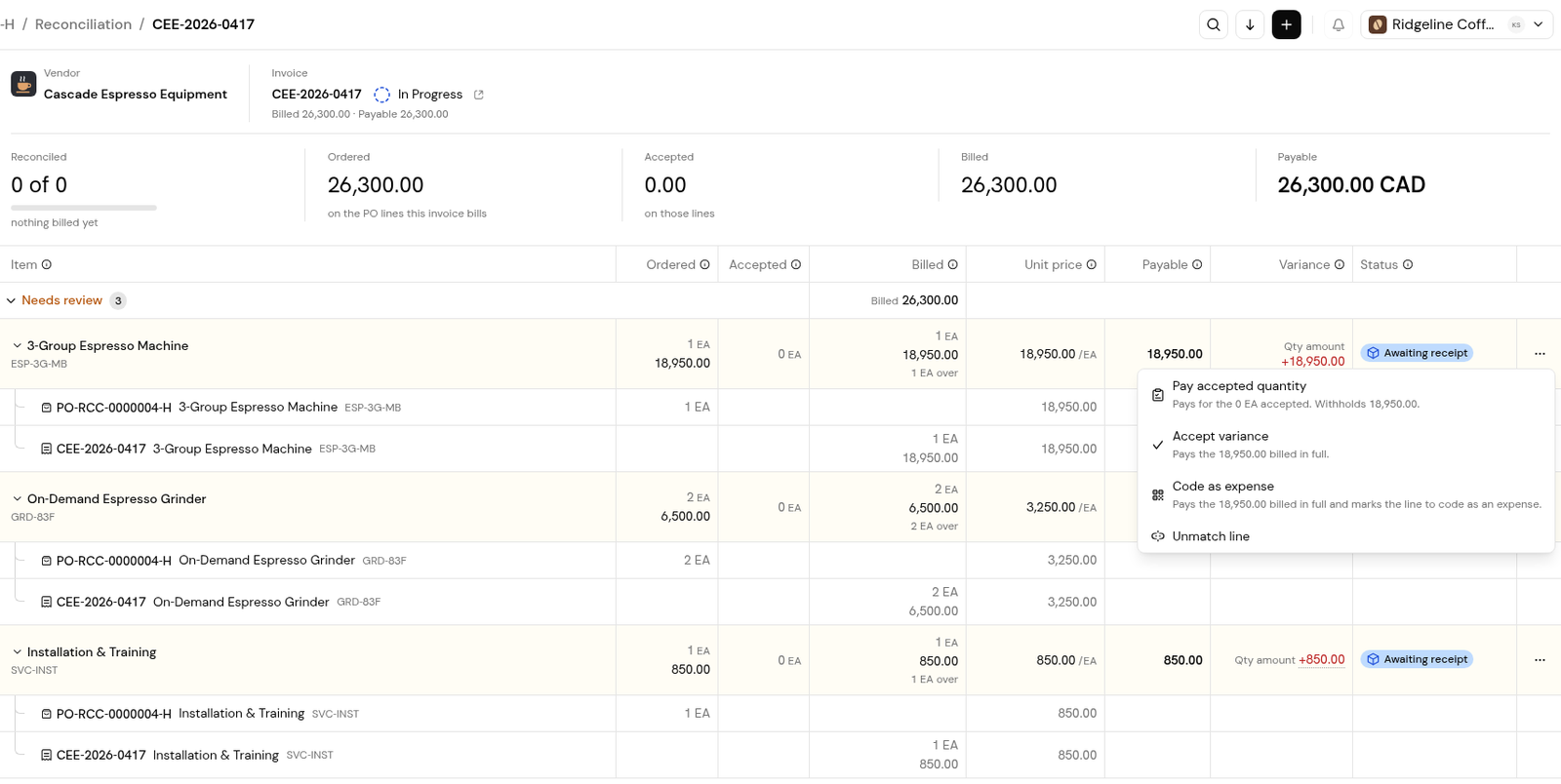
Lines Awaiting receipt with variances, and the row menu with Pay accepted quantity, Accept variance, Code as expense and Unmatch line.

5. When every line is decided, return to the invoice. PO reconciliation resolved is complete.
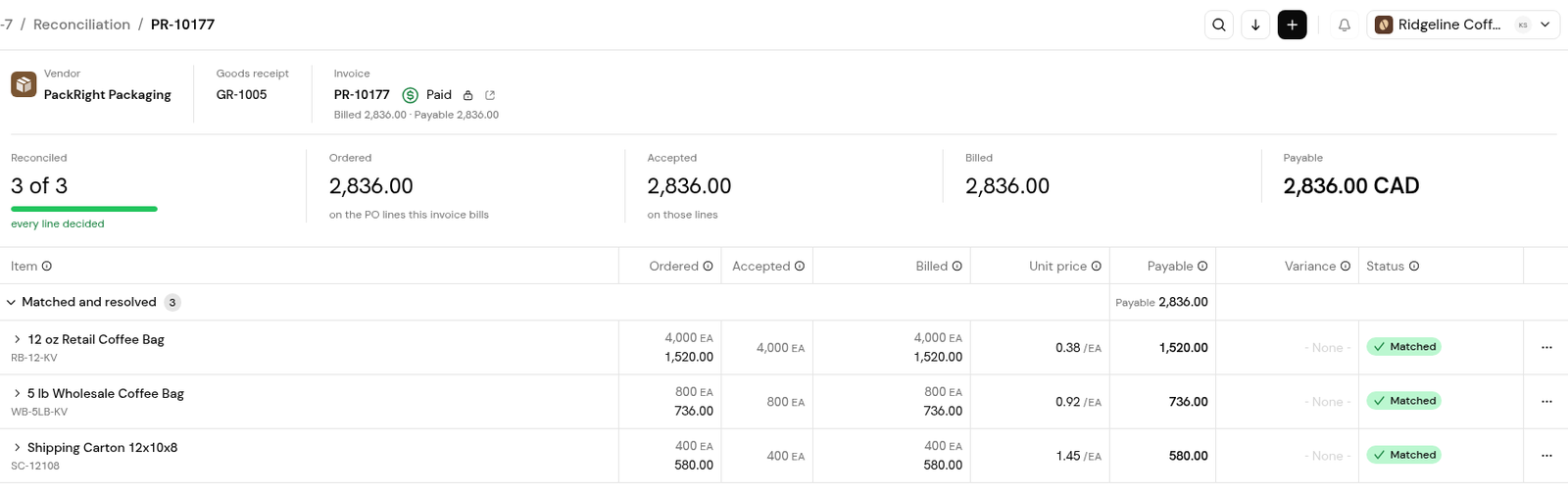
A fully reconciled invoice: every line Matched and resolved, and the Reconciled card at 3 of 3.
  • Pay accepted quantity: Pays for the quantity accepted on the posted receipt and withholds the rest.
  • Pay PO price: On a price variance line: pays the PO unit price and withholds the difference.

  • Accept variance: Pays the billed amount in full.
  • Code as expense: Pays the billed amount and marks the line to be coded as an expense.
  • Unmatch line: Removes the match to the PO line. Finofo asks you to confirm.

Handle Common Mismatches

Each mismatch below shows an example, followed by the typical resolution.

  • Awaiting receipt: Ordered 600 kg, accepted 480 kg, billed 600 kg.
    Wait for the remaining receipt, or choose Pay accepted quantity.
  • Price variance: Billed $712 per bag against $700 on the PO.
    If the change was agreed, choose Accept variance. If not, choose Pay PO price or raise it with the vendor.
  • Charge that belongs in expenses: A charge that should be coded to an expense account, not the PO line.
    Choose Code as expense.

Tips

  • Talk to purchasing before deciding a price variance; it may reflect an agreed change not yet on the PO.
  • Set realistic tolerances so small rounding differences match automatically.
  • Post receipts promptly so quantity lines can match.

Frequently Asked Questions

Why can't I submit an invoice with a mismatch?

It cannot go for approval until someone decides what to pay for each line that differs from the PO and receipt.

Can I put a reconciliation line on hold?

No. Leave an Awaiting receipt line until the receipt is posted, or decide it from the row menu.

What does Pay PO price do?

On a price variance line, it pays the PO unit price and withholds the difference.

Back to
Matching and reconciliation