Batch payments lists every payment run by status, from Draft through Paid, with tabs for batches that were rejected, discarded or failed.
Open a batch to see its summary and a link to Finofo Payments, and open an invoice's Payments panel to see what was paid and when.
The list has the tabs Draft, In Progress, In Approval, Partially Paid, Paid, Rejected, Discarded, Failed and All. Each row shows the batch Name, for example "Batch of Sep 29, 2026 for 4,014.80 CAD", with Created at, Created by, Invoices, Vendors, Total amount and External link. The All tab adds a Status column and groups batches by status.
The batch's Payment Summary shows the currency total on the Finofo Payment line, the Status pill, Created, Created by, Invoices and Vendors. Approval and release happen in Finofo Payments, which opens from the link icon on the batch's Status pill or from Payments in the left menu. Finofo Payments keeps the detail of each batch: the approval stages it went through, the conversion rates locked in and how many payments were made. A batch where some payments complete and others don't is only partly paid.
Invoices follow their batch. They show on the In Payment tab while the batch is open and move to Paid once they are paid in full. Each vendor receives a payment notification with a remittance PDF.
1. Open Batch payments and select a status tab, or All.

2. Use Sort to order the list, for example by date created.
3. Open the batch and check its Payment Summary.
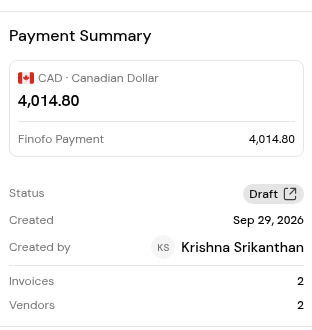
4. Click the link icon on the Status pill, or the icon in the External link column, to follow the batch in Finofo Payments.
1. Open the invoice from Documents > Invoices > Paid or In Payment.
2. In the Overview panel, go to Payments. Check the status, for example Paid fully or Partially paid, and the Payment history.
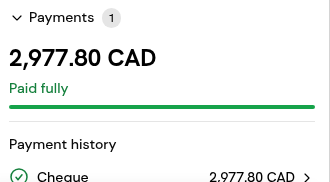
3. For the exact time, open the Activity tab with All changes selected and find the "completed a payment" event.
In Finofo Payments. Open it from the link icon on the batch's Status pill, or from Payments in the left menu.
Some payments in the batch completed and others did not. Check the batch in Finofo Payments to see which.
It moves to the Paid tab, and its Payments panel shows Paid fully with the Payment history.
Yes. Each payment notification includes a remittance PDF with earlier payments, credits, this payment and the remaining balance.


